

English
Configuration Steps
This documentation only applies to templates in HTML format (source files are PDFs, but historically treated as HTML)
HTML Templates Support APL Data for Printing
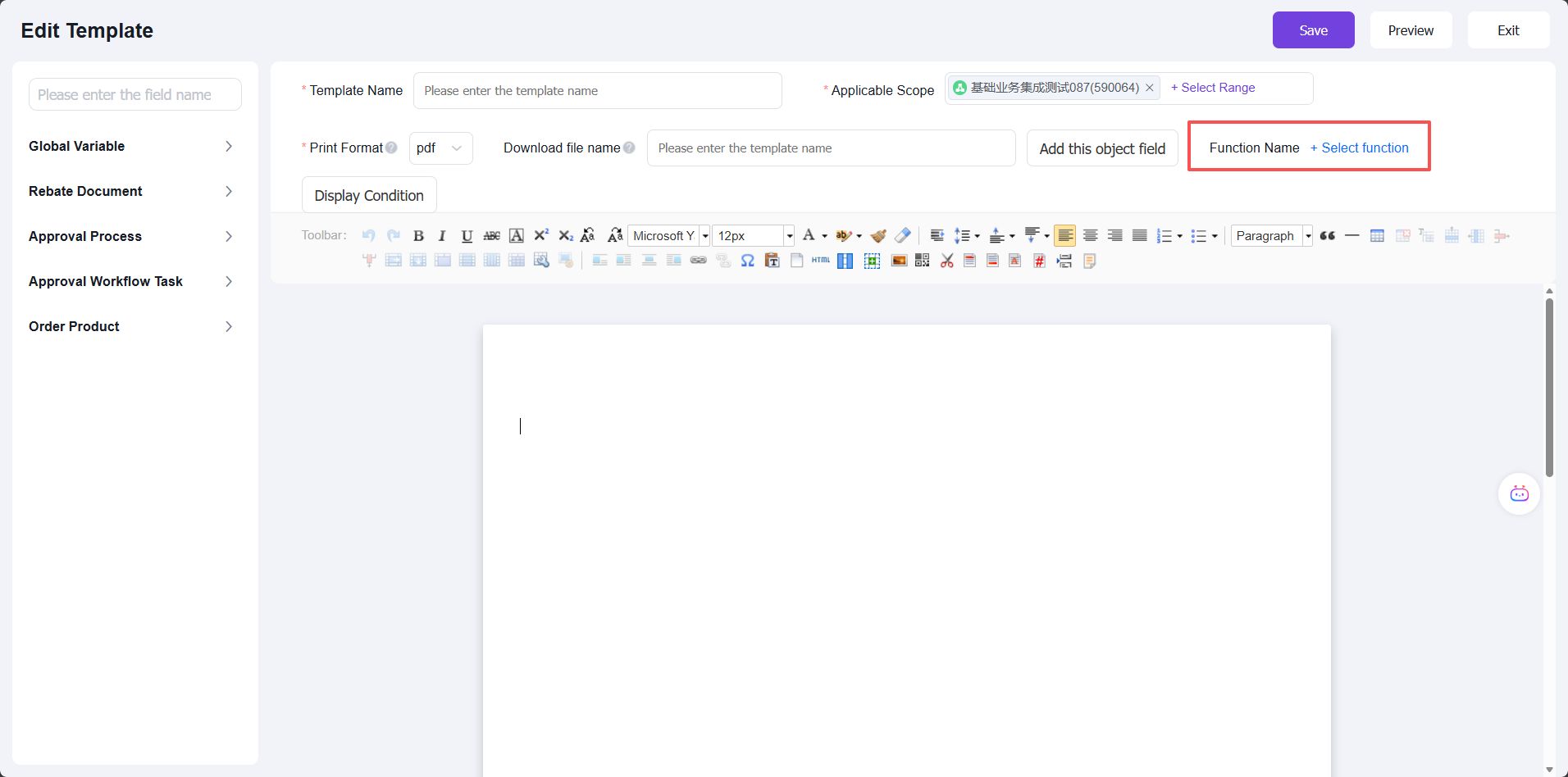
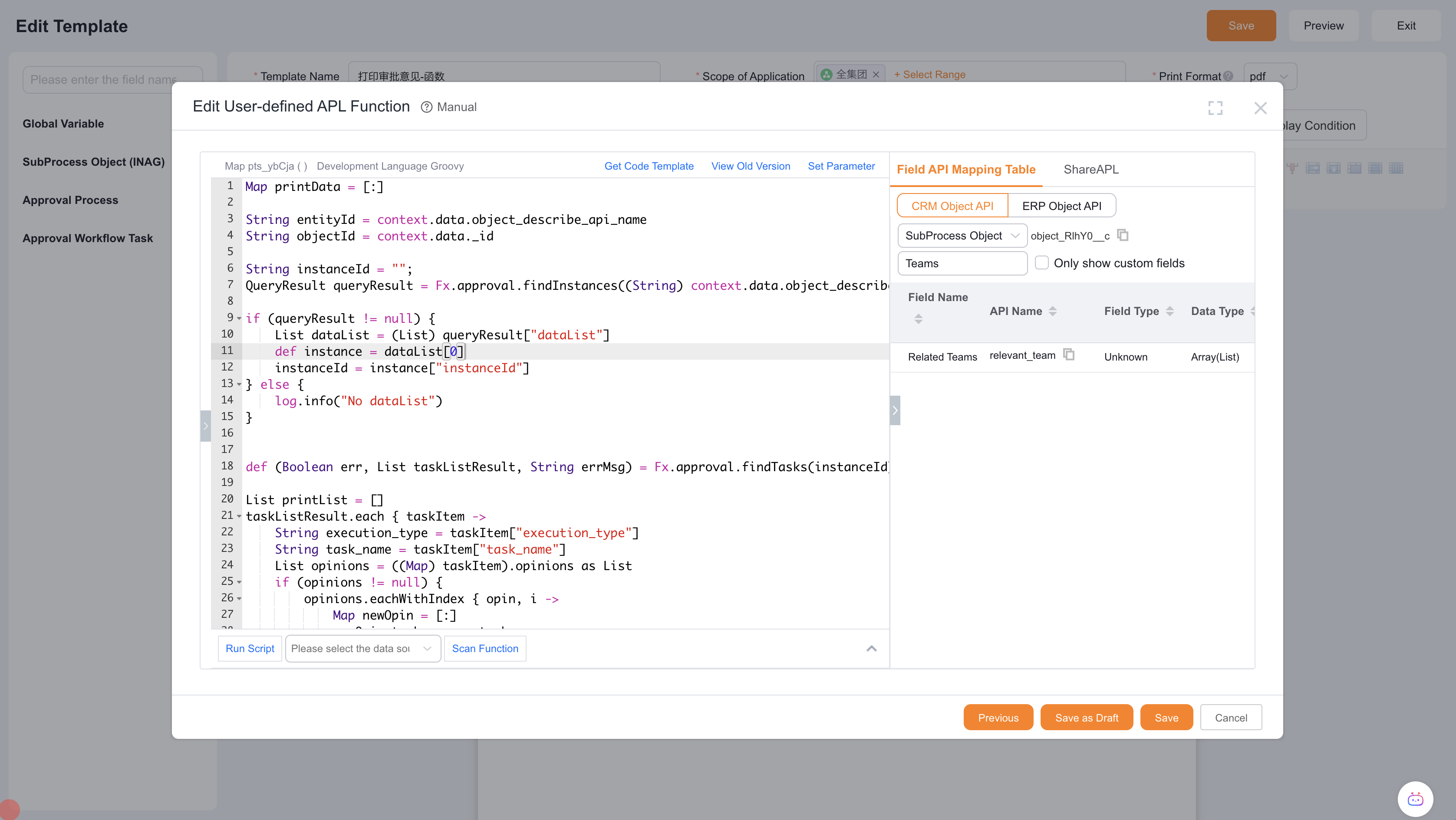
Apply for Gray Release Print Template Supports APL Functions
Use Cases
1. Printing Multi-level Associated Fields of an Object
For order or contract objects, when printing detail data, we may need to output additional product attributes associated with the line items, such as product category or specifications. For multi-spec products, some attributes may require association with SPU (Standard Product Unit).
Using APL's data query capabilities, we can achieve this multi-level association output.
Example: Printing contract line items showing SKU (Stock Keeping Unit, e.g. Destroyer 05 2024 DM-i Glory Edition 1.5L 120km) associated with SPU (Standard Product Unit, e.g. Destroyer 05) and its energy type (e.g. Plug-in Hybrid). The relationship is: Contract Line Item → SKU → SPU.
APL Code
/**
 * @author admin01
 * @codeName Print Contract Line Items
 * @description Print contract product line items
 * @createTime 2024-09-04
 */

List details = context.details.SaleContractLineObj as List
List skuIds = []

details.each { entry ->
  Map detail = entry as Map
  String skuId = detail.get("product_id")
  skuIds.add(skuId)
}

def fqa = FQLAttribute.builder().columns(["_id", "name", "price", "is_giveaway", "picture_path", "spu_id"]).build()
def sa = SelectAttribute.builder().build()

List prodctList = Fx.object.findByIds("ProductObj", skuIds, fqa, sa).result() as List
Map skuId2SpuIdMap = prodctList.collectEntries { [(((Map) it)._id): ((Map) it).spu_id] }
Map skuId2Map = prodctList.collectEntries { [(((Map) it)._id): ((Map) it)] }
log.info(skuId2Map)

def spuIds = skuId2SpuIdMap.values() as List

def fqa2 = FQLAttribute.builder().columns(["_id", "name", "is_spec"]).build()
def sa2 = SelectAttribute.builder().build()

List spuList = Fx.object.findByIds("SPUObj", spuIds, fqa2, sa2).result() as List
Map spuMap = spuList.collectEntries { [(((Map) it)._id): ((Map) it)] }
log.info(spuMap)

details.each { entry ->
  Map detail = entry as Map
  String skuId = detail.get("product_id")

  Map skuData = skuId2Map.get(skuId)
  String isGiveaway = skuData.get("is_giveaway")
  String isGiveawayLabel = ""
  if ("1" == isGiveaway) {
    isGiveawayLabel = "Yes"
  } else if ("0" == isGiveaway) {
    isGiveawayLabel = "No"
  } else {
    isGiveawayLabel = "Unknown"
  }
  skuData.put("isGiveawayLabel", isGiveawayLabel)
  detail.put("SKUObj", skuData)

  String spuId = skuId2SpuIdMap.get(skuId) as String
  Map spu = spuMap.get(spuId) as Map
  boolean isSpec = spu.get("is_spec") as Boolean
  Map spuData = [:]
  if(isSpec){
    spuData.put("is_spec", "Multi-spec")
  } else {
    spuData.put("is_spec", "Single-spec")
  }
  detail.put("SPUObj", spuData)
}

Map map = [:]
map.put("MySaleContractLineObj", details)

return map
Template Source Code
<p>
  <!--
  #set(MyList = pts_ZhFaS__c.MySaleContractLineObj)
  -->
</p>
<table>
  <thead>
    <tr class="firstRow">
      <th>
        <span class="variable-label">Contract Line No.</span>
      </th>
      <th>
        <span class="variable-label">Multi-spec</span>
      </th>
      <th>
        <span class="variable-label">Product Name</span>
      </th>
      <th>
        <span class="variable-label">Gift Item</span>
      </th>
      <th>
        <span class="variable-label">Unit Price</span>
      </th>
    </tr>
  </thead>
  <tbody>
    <!--#for(item : MyList)-->
    <tr>
      <td>${item.name}</td>
      <td>${item.SPUObj.is_spec}</td>
      <td>${item.SKUObj.name}</td>
      <td>${item.SKUObj.isGiveawayLabel}</td>
      <td>${item.SKUObj.price}</td>
    </tr>
    <!--#end-->
  </tbody>
  <tfoot>
    <tr>
      <td>Table rows will auto-load based on actual data volume</td>
    </tr>
  </tfoot>
</table>
<p>
  <br />
</p>
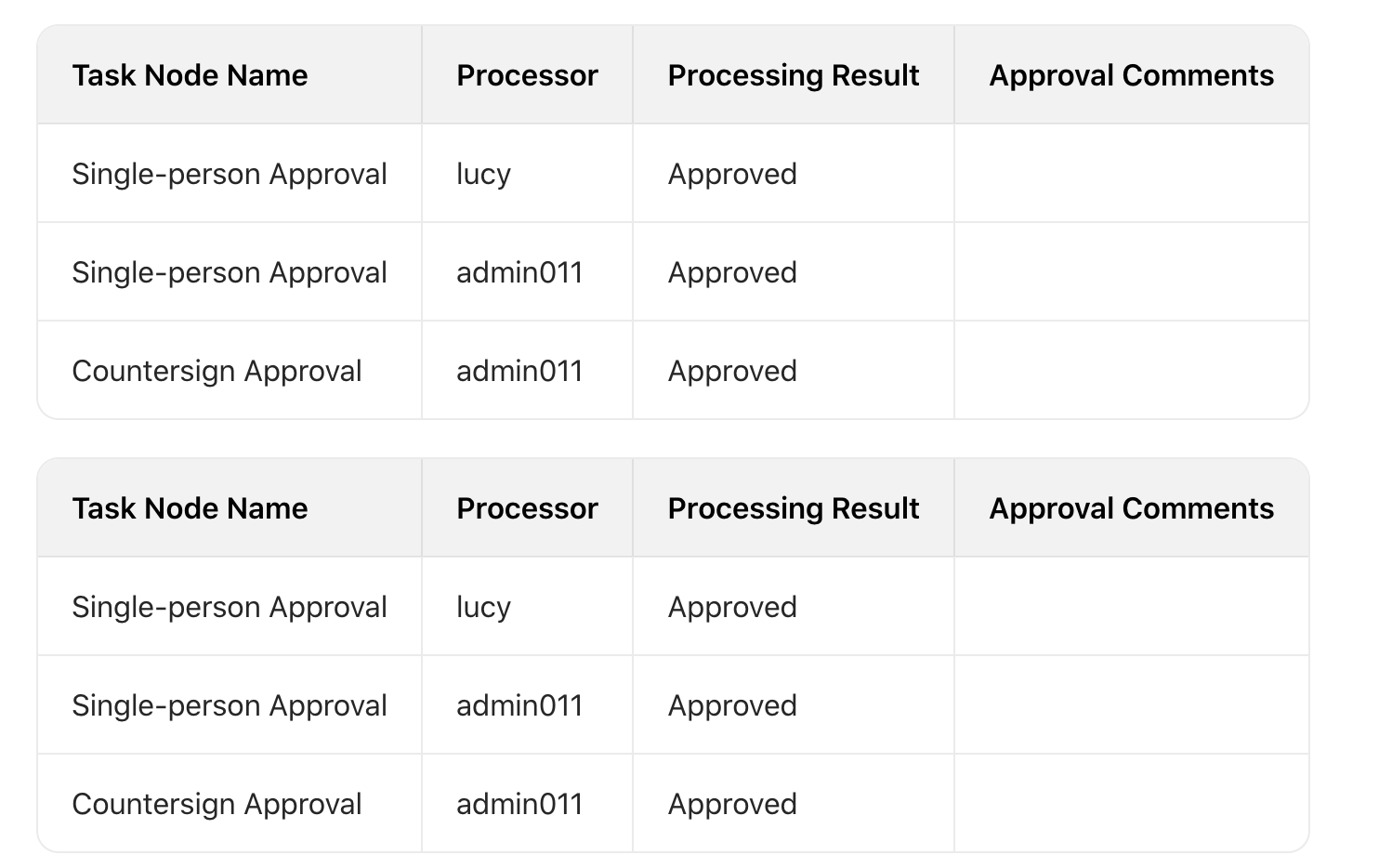
2. Printing Irregular Table Format Approval Data
Normal vs Chinese Leadership Preference
Prerequisites
HTML Template Engine Syntax
Conditional Statements #if, #elseif, #else
HTML Learning
Implementing irregular tables requires cell merging operations. Basic knowledge of HTML table tags is needed to understand how HTML tables implement cell merging.
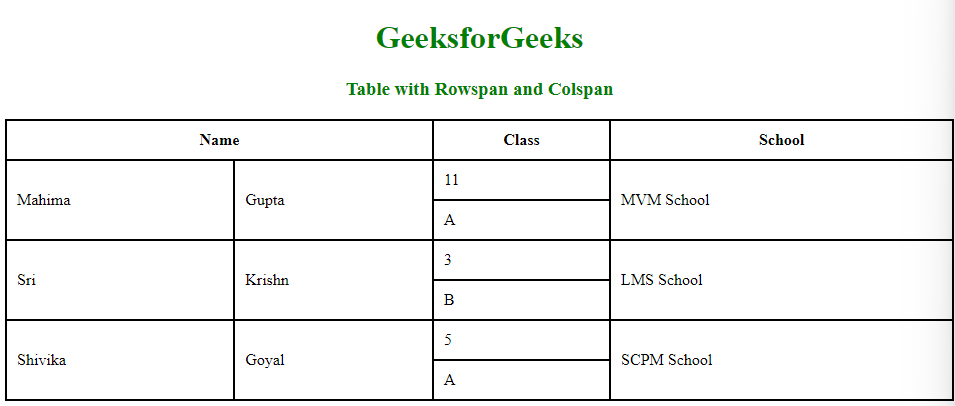
HTML Table Colspan and Rowspan
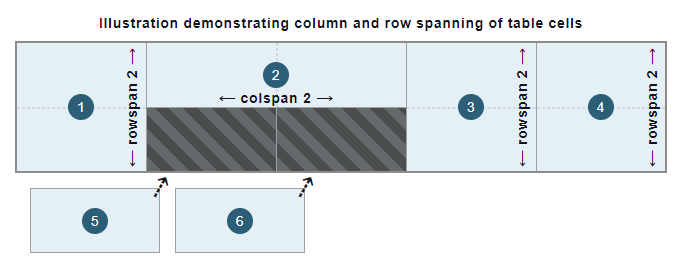
HTML Table Colspan and Rowspan
td
For approval data, add an
instanceIdparameter of typeStringin APL to receive the process instance ID from the print template (ultimately passed from the web page).
APL provides a Map. For list data, use tables for display. Each record (objectData or record) becomes a row in the table, and each field value becomes a cell.
APL queries the approval instance list, then calculates each cell's
colspanandrowspanthrough grouping. If a cell is merged, itsrowspanorcolspanshould be set to 0.

APL Calculates Each Cell's Rowspan and Colspan Based on Rules
Below is a case requiring column merging for identical task names.
Data JSON Format
{
    "instanceList": [
        {
            "task_name": "Single Approval",
            "reply_user": "lucy",
            "action_type": "Approve",
            "opinion": "ok",
            "span": {
                "task_name": {
                    "colspan": 1,
                    "rowspan": 2
                }
            }
        },
        {
            "task_name": "Single Approval",
            "reply_user": "tom",
            "action_type": "Approve",
            "opinion": "Yes",
            "span": {
                "task_name": {
                    "colspan": 1,
                    "rowspan": 0
                }
            }
        },
        {
            "task_name": "Counter-sign Approval",
            "reply_user": "scott",
            "action_type": "Approve",
            "opinion": "",
            "span": {
                "task_name": {
                    "colspan": 1,
                    "rowspan": 1
                }
            }
        }
    ]
}
APL Code:
/**
 * @author admin01
 * @codeName Print Approval
 * @description How to pass parameters
 * @createTime 2024-07-08
 */
Map map = [:]

def (Boolean err, List instanceList, String errMsg) = Fx.approval.findTasks(instanceId)

List printList = []
instanceList.each { inst ->
  List opinions = ((Map) inst).opinions as List
  opinions.eachWithIndex { opin, i ->
    Map newOpin = [:]
    // Approval node name
    newOpin.task_name = ((Map) inst).task_name
    // Approver
    String replyUser = ((List) ((Map) opin).reply_user)[0]
    def (Boolean err1, Map userInfo, String errMsg1) = Fx.org.findUserById(replyUser)
    if(!err1){
      newOpin.reply_user = userInfo.full_name
    } else {
      log.info(errMsg1)
    }
    // Approval result
    String type = ((Map) opin).action_type
    if(type == 'agree'){
      newOpin.action_type = 'Approve'
    } else if(type == 'reject'){
      newOpin.action_type = 'Reject'
    } else if(type == 'cancel'){
      newOpin.action_type = 'Cancel'
    }
    // Approval comments
    newOpin.opinion = ((Map) opin).opinion
    // Initialize colspan and rowspan for task_name merging
    Map spanTaskName = [task_name: [colspan: 1, rowspan: 1]]
    newOpin.span = spanTaskName
    printList.add(newOpin)
  }
}

// Group by task_name to calculate row merging
Map groupedByTaskName = printList.groupBy { ((Map) it).task_name }.collectEntries { [(it.key): (it.value)] }
groupedByTaskName.each { entry ->
  def taskList = entry.value as List`<Map>`
    if (taskList.size() <= 1) return

    taskList.eachWithIndex { task, i ->
        Map span = ((Map) task).span as Map
        Map taskNameSpan = span.task_name as Map
        if (i == 0) {
            taskNameSpan.rowspan = taskList.size()
        } else {
            taskNameSpan.rowspan = 0
        }
    }
}

map.put('instanceList', printList)

return map
Template Source Code
Configure the print template with if statements to hide td elements where rowspan is 0, and display those greater than 0, setting the td's rowspan attribute accordingly. 
<p>
  <br />
</p>
<table width="100%">
  <thead>
    <tr class="firstRow">
      <th>Task Node</th>
      <th>Approver</th>
      <th>Result</th>
      <th>Comments</th>
    </tr>
  </thead>
  <tbody>
    <!--#for(entry:pts_sNsPA__c.instanceList)-->
    <tr>
      <td>${entry.task_name}</td>
      <td>${entry.reply_user}</td>
      <td>${entry.action_type}</td>
      <td>${entry.opinion}</td>
    </tr>
    <!--#end-->
  </tbody>
</table>
<p>
  <br />
</p>
<table width="100%">
  <thead>
    <tr class="firstRow">
      <th>Task Node</th>
      <th>Approver</th>
      <th>Result</th>
      <th>Comments</th>
    </tr>
  </thead>
  <tbody>
    <!--#for(entry:pts_sNsPA__c.instanceList)-->
    <tr>
      <!-- #if (entry.span.task_name.rowspan != 0) -->
      <td rowspan="${entry.span.task_name.rowspan}">${entry.task_name}</td>
      <!-- #end -->
      <td>${entry.reply_user}</td>
      <td>${entry.action_type}</td>
      <td>${entry.opinion}</td>
    </tr>
    <!--#end-->
  </tbody>
</table>
<p>
  <br />
</p>
Summary
Through these examples, theoretically any data - whether directly related or unrelated to the primary object - can be printed using print templates + APL. Examples include:
- Printing grouped records by business type (record_type) or other option fields into multiple tables
- Aggregating list record fields (sum, average) or hiding certain records (more flexible than template filters)
- Multi-level associated field values (Custom Object A → Custom Object B → ... → Custom Object Z, printing fields from A to Z)
Practice
Implementing Transposed Data Display
For example, if the data appears as shown below with "Sales Region" as column headers and "Quarter" on the left:
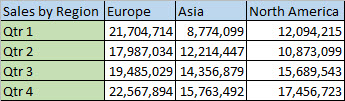
Make "Quarter" appear as column headers with "Sales Region" on the left:

Headers
[
    "Sales by Region",
    "Europe",
    "Asia",
    "North America"
]
Data
[
    {
        "quarter": "Qt 1",
        "eu": "21704714",
        "as": "8774099",
        "na": "12094215"
    },
    {
        "quarter": "Qt 2",
        "eu": "17987034",
        "as": "12214447",
        "na": "10873099"
    },
    {
        "quarter": "Qt 3",
        "eu": "19485029",
        "as": "14536879",
        "na": "15689543"
    },
    {
        "quarter": "Qt 4",
        "eu": "22567894",
        "as": "15763492",
        "na": "17456723"
    }
]