

简体中文
form_render_before_custom_field
自定义主对象字段组件示例
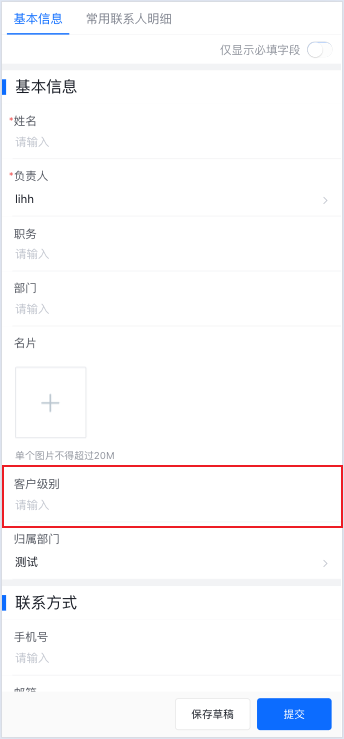
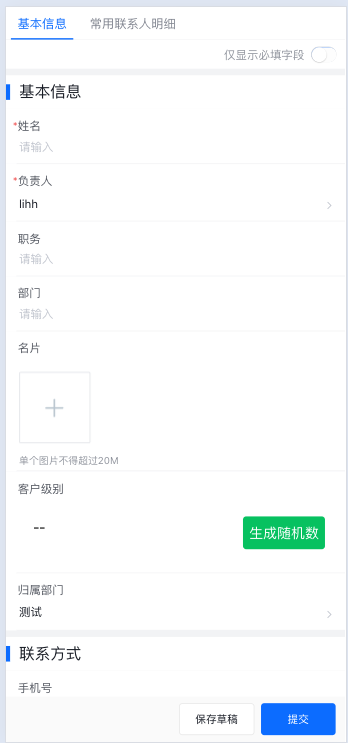
示例效果
- 自定义name字段组件的value部分UI和交互,由默认的输入框,改为一个按钮,点击按钮生成随机数赋值给name字段。
目录结构:
root:
  - index.js
  - config.json
  - customText/
  	- index.js
  	- index.json
    - index.wxml
    - index.wxss
- fieldbehavior.js入口文件:index.js
module.exports = function (context, pluginService, pluginParam) {
    return {

        /**
         * 启用V2版本的自定义插件,必须
         */
        enableCustomPluginV2(){
            return true;
        },

        apply() {
            return [
                {
                    event: "form.render.before",
                    functional: function (pluginExecResult, options) {
                        return {
                            master_field_components: {//要重写的主对象字段组件
                                "name": {
                                    resource: "custom_plugin",//必须,固定写死
                                    prop: {//必须,插件字段组件基本属性
                                        pluginInfo: pluginParam.describe,//必须,自定义插件基本信息
                                        comInfo: {//必须,自定义插件字段组件信息
                                            name: "customText", //(必须)自定义字段组件的名称,根目录config.json文件中components节点中指向对应组件的key
                                            prop: {test: 1},//会透传到自定义字段组件customProp属性,格式不限。
                                            renderMode: "value",//自定义字段组件渲染模式,field: 字段整体替换(默认); value: 替换value部分;
                                        }
                                    }
                                }
                            }
                        }
                    }
                }
            ]
        }
    }
}配置文件:config.json
{
	"components":{
		"customText": "customText/index"
	},
	"main":"index.js"
}字段默认引入behavior:fieldbehavior.js
export default Behavior({
  properties:{
    context:{//上下文
      type:Object
    },
    field:{//字段描述
      type:Object
    },
    value:{//字段值
      type:null
    },
    is_required:{//字段必填状态
      type:Boolean
    },
    is_readonly:{//字段只读状态
      type:Boolean
    },
    customProp:{//插件自定义字段组件属性
      type:null
    }
  },
})
自定义字段组件:customText
customText/index.js
import fieldbehavior from "../fieldbehavior";
Component({
  behaviors:[fieldbehavior],
  methods:{
    _testMethod(){
      let {context, field}=this.data;
      let random = Math.round(Math.random()*1000)+''
      context.setData({
        [field.api_name]:random
      })
    }
  },
  lifetimes:{
    attached() {
      console.log("插件自定义字段attached", this.data.field)
    }
  }
});
customText/index.wxml
<view class="container">
<!--    <view class="label">{{field.label}}</view>-->
    <view class="value" style="{{value>500?'color:red;':''}}">{{value==null?'--':value}}</view>
    <view class="button" bind:tap="_testMethod">生成随机数</view>
</view>
customText/index.wxss
.container{
  display: flex;
  flex-direction: row;
  padding: 32rpx;
  font-size: 32rpx;
  word-break: break-all;
}
.label{
  font-weight: bold;
  width: 254rpx;
  margin-right: 12px;
}
.value{
  flex: 1;
}

.button {
  width: 100px;
  height: 40px;
  line-height: 40px;
  margin-left: 12px;
  text-align: center;
  background-color: #07c160;
  color: white;
  border-radius: 4px;
  align-self: center;
}
.button.hover {
  background-color: #06a754;
}
customText/index.json
{
  "component": true,
  "usingComponents": {
  }
}