

简体中文
detail.render.before
注册一个回调函数,在详情页页面渲染之前执行;回调函数内可以预处理详情数据、处理弹层类组件渲染、定制通用按钮点击事件、定制详情导航栏业务按钮以及其他定制逻辑。
- 注册一个回调函数,在详情页页面渲染之前执行,刷新详情页也会触发回调函数。
- 回调函数内可以预处理详情数据、处理弹层类组件渲染、定制通用按钮点击事件、定制详情导航栏业务按钮以及其他定制逻辑等。
apply() {
  return [
    {
      event: 'detail.render.before',
      functional: function (pluginExecResult, options) {
        // 详情页页面渲染之前要执行的逻辑
        console.log('custom plugin: detail.render.before exec')
      }
    }
  ]
}
参数
事件通用参数 pluginExecResult、options 请参考相关文档
该事件中options参数特有属性说明
| 属性 | 说明 | 类型 |
|---|---|---|
| detailRst | 对象详情接口完整数据,插件中可以直接改造,后续逻辑可使用改造后的数据 | Object |
返回结果
| 字段 | 说明 | 类型 |
|---|---|---|
| fixedComponents | 处理弹层类组件渲染(可选) | Array |
| buttonClickHandlers | 定制通用按钮点击事件(可选) | Object |
| navBusinessBtns | 定制详情导航栏业务按钮(可选) | Array |
| 其他定制逻辑 | — | — |
fixedComponents字段说明
| 属性 | 说明 | 类型 |
|---|---|---|
| resource | 插件来源,固定值custom_plugin(必填) | String |
| prop | 传入组件的属性(必填) | Object |
prop字段说明
| 属性 | 说明 | 类型 |
|---|---|---|
| pluginInfo | 插件基本信息(必填) | String |
| comInfo | 自定义组件信息(必填) | Object |
comInfo字段说明
| 属性 | 说明 | 类型 |
|---|---|---|
| name | 自定义组件名称(必填) | String |
| prop | 自定义组件属性(必填) | 不限 |
{
  event: 'detail.render.before',
  functional: function (pluginExecResult, options) {
    // 详情页页面渲染之前要执行的逻辑:处理弹层类组件渲染(固定定位的组件)
    let fixedComponents = (pluginExecResult.preData&&pluginExecResult.preData.fixedComponents) || []
    fixedComponents.push({
      resource: 'custom_plugin', // 必填,固定写死
      prop: { // 必填,插件基本属性
        pluginInfo: pluginParam.describe, // 必填,插件基本信息
        comInfo: { // 必填,自定义组件信息
          name: '', // 必填,自定义组件名称,来自根目录config.json文件中components节点
          prop: {}, // 自定义组件属性,会透传到自定义组件customProp属性,格式不限
        },
      }
    })

    return {
      fixedComponents
    }
  }
}buttonClickHandlers字段说明
| 属性 | 说明 | 类型 |
|---|---|---|
| 按钮api_name | 详见按钮api_name相关文档 | Function |
{
  event: 'detail.render.before',
  functional: function (pluginExecResult, options) {
    // 详情页页面渲染之前要执行的逻辑:定制通用按钮点击事件
    const buttonClickHandlers = {
      按钮api_name: function () {
        // 点击事件处理函数
      }
    }

    return {
      buttonClickHandlers
    }
  }
}
完整结果示例
{
  event: 'detail.render.before',
  functional: function (pluginExecResult, options) {
    // 详情页页面渲染之前要执行的逻辑:处理弹层类组件渲染(固定定位的组件)
    const fixedComponents = (pluginExecResult.preData&&pluginExecResult.preData.fixedComponents) || []
    fixedComponents.push({
      resource: 'custom_plugin', // 必填,固定写死
      prop: { // 必填,插件组件基本属性
        pluginInfo: pluginParam.describe, // 必填,插件基本信息
        comInfo: { // 必填,自定义组件信息
          name: '', // 必填,自定义组件名称,来自根目录config.json文件中components节点
          prop: {}, // 自定义组件属性,会透传到自定义组件customProp属性,格式不限
        },
      }
    })

    // 详情页页面渲染之前要执行的逻辑:定制通用按钮点击事件
    const buttonClickHandlers = {
      按钮api_name: function () {
        // 点击事件处理函数
      }
    }

    return {
      fixedComponents,
      buttonClickHandlers
      // 其他组件定制逻辑......
    }
  }
}navBusinessBtns字段说明
| 属性 | 说明 | 类型 | 默认值 |
|---|---|---|---|
| type | 图标类型,字体图标时可忽略 | String | 'link':表示图标地址是外部链接 |
| icon | 图标地址 或 字体图标类名 | String | 无 |
| api_name | 图标按钮api_name | String | 无 |
| onClick | 图标按钮点击事件 | Function | 无 |
{
  event: 'detail.render.before',
  functional: function (pluginExecResult, options) {
    // 详情页页面渲染之前要执行的逻辑:定制详情导航栏业务按钮
    const navBusinessBtns = [
      {
        type: '', // 图标类型,如果要传入外部图标链接,必传 type: 'link'
        icon: '', // 外部图标链接
        api_name: '',
        onClick() {
          // 点击事件处理函数
        }
      },
      {
        icon: '', // 字体图标
        api_name: '',
        onClick() {
          // 点击事件处理函数
        }
      }
    ]

    return {
      navBusinessBtns
    }
  }
}
代码示例
预处理详情数据
- 需求:
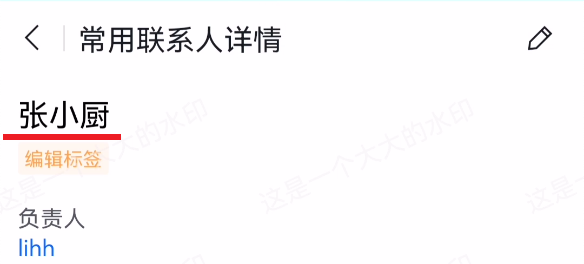
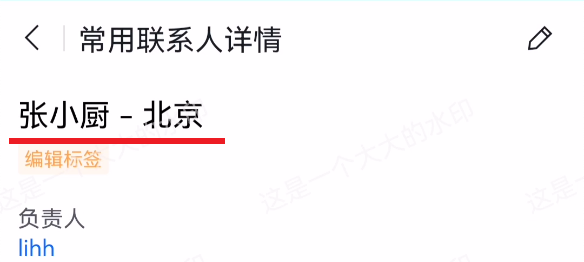
实现:修改
data字段中的name属性值{ event: 'detail.render.before', functional: function (pluginExecResult, options) { // 详情页页面渲染之前要执行的逻辑:预处理详情数据 options.detailRst.data.name = options.detailRst.data.name + ' - 北京' } }
其他数据预处理: 修改
layout字段,实现隐藏字段效果等
apply() {
  return [
    {
      event: 'detail.render.before',
      functional: function (pluginExecResult, options) {
        // 隐藏字段: 以隐藏owner为例
        options.detailRst.layout.components[3].field_section[0].form_fields = options.detailRst.layout.components[3].field_section[0].form_fields.filter(item=>item.field_name !== 'owner')
      }
    }
  ]
}
处理弹层类组件渲染
展示弹层组件
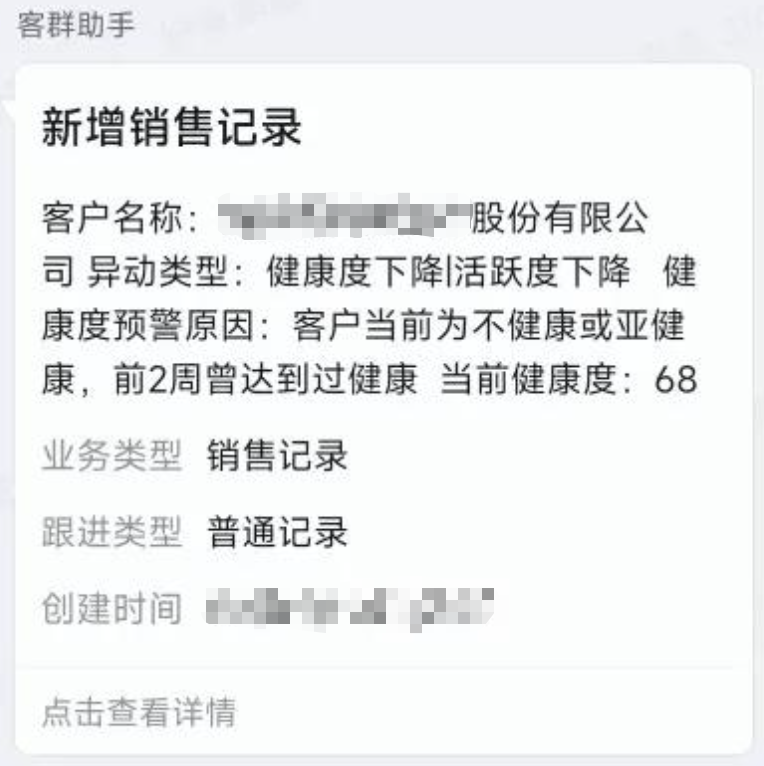
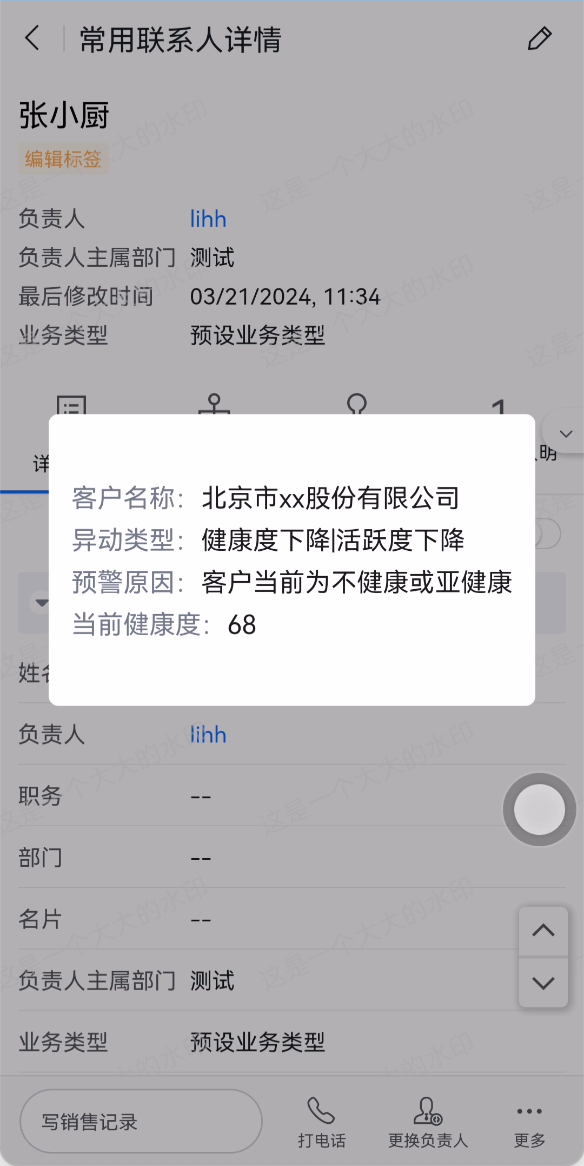
弹层组件中:
components/dialog/index.html
<view wx:if="{{dShow}}">
  <view class="mask" catch:touchmove="preventTouchmove" catch:tap="tapmask"></view>
  	<view class="wrapper" catch:touchmove="preventTouchmove">
  		<view class="content">
  			<view class="item">
  				客户名称:<text class="txt">{{customProp.name}}</text>
  			</view>
  			<view class="item">
  				异动类型:<text class="txt">{{customProp.transaction_type}}</text>
  			</view>
  			<view class="item">
  				预警原因:<text class="txt">{{customProp.reason}}</text>
  			</view>
  			<view class="item">
  				当前健康度:<text class="txt">{{customProp.score}}</text>
  			</view>
  		</view>
  	</view>
</view>
弹层组件中:
components/dialog/index.js
Component({
  properties: {
    context: { // 插件上下文信息
      type: Object
    },
    customProp: { // 传入组件的自定义数据
      type: Object
    }
  },
  data: {
    dShow: false // 默认隐藏
  },
  methods: {
    // 阻止默认行为
    preventTouchmove() {},
    // 点击背景关闭弹层
    tapmask() {
      this.setData({
        dShow: false
      })
    }
  },
  lifetimes: {
    attached() {
      // 展示弹层提示框
      this.setData({ dShow: true })
    }
  }
})
插件中:
plugins/testplugin.js
{
  event: 'detail.render.before',
  functional: function (pluginExecResult, options) {
    // 详情页页面渲染之前要执行的逻辑:处理弹层类组件渲染(固定定位的弹窗)
    const fixedComponents = (pluginExecResult.preData&&pluginExecResult.preData.fixedComponents) || []
    fixedComponents.push({
      resource: 'custom_plugin',
      prop: {
        pluginInfo: pluginParam.describe,
        comInfo: { // 返回dialog弹窗组件
          name: 'dialog',
          prop: {
            name: '北京市xx股份有限公司',
            transaction_type: '健康度下降|活跃度下降',
            reason: '客户当前为不健康或亚健康',
            score: 68
          }
        }
      }
    })

    return {
      fixedComponents
    }
  }
}
定制通用按钮点击事件
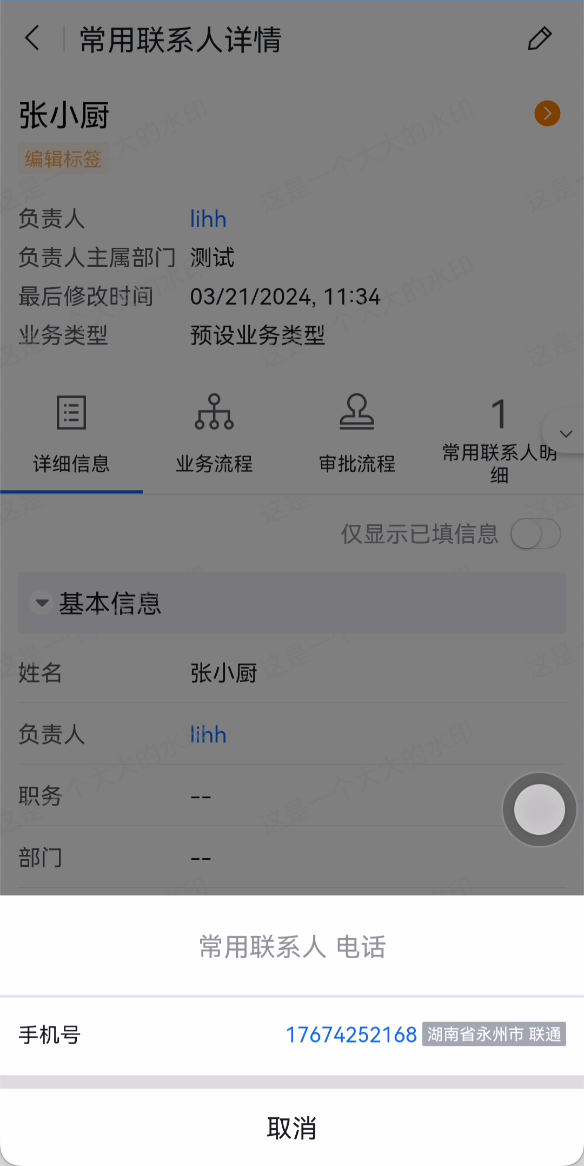
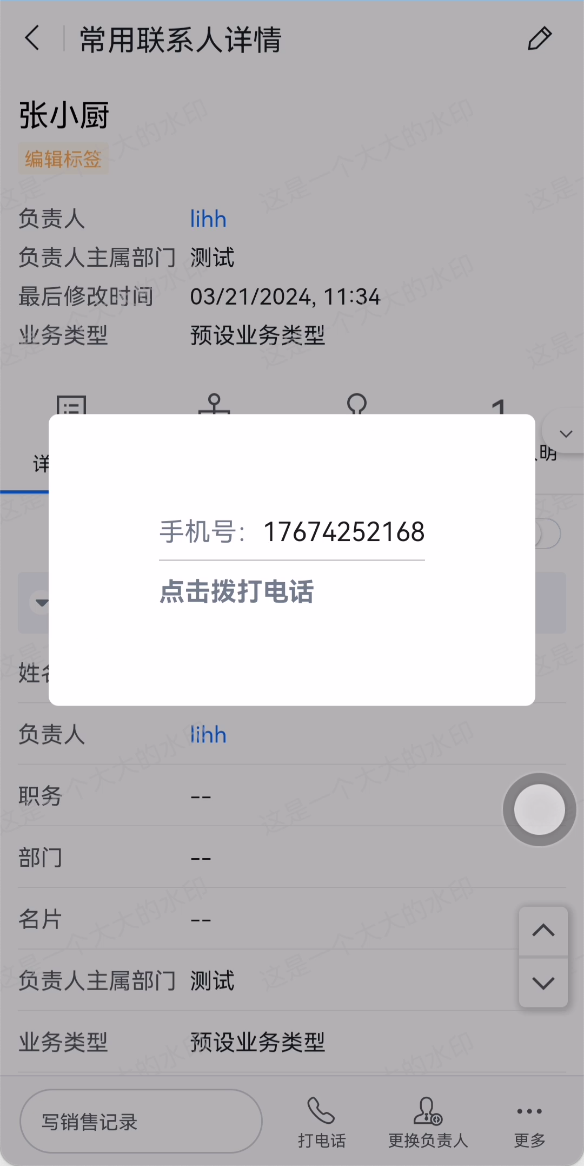
点击详情页底部操作栏按钮弹出弹框组件
弹层组件中:
components/modal/index.wxml
<view wx:if="{{dShow}}">
  <view class="mask" catch:touchmove="preventTouchmove" catch:tap="tapmask"></view>
  	<view class="wrapper" catch:touchmove="preventTouchmove">
  		<view class="content">
  			<view class="item">
        手机号:<text class="txt">{{customProp.mobile}}</text>
      </view>
  			<view class="item" catch:tap="makePhoneCall" style="font-weight: 700;">
        点击拨打电话
      </view>
  		</view>
  	</view>
</view>
弹层组件中:
components/modal/index.wxml
Component({
  properties: {
    context: { // 插件上下文信息
      type: Object
    },
    customProp: { // 传入组件的自定义数据
      type: Object
    }
  },
  data: {
    dShow: false // 默认隐藏
  },
  methods: {
    // 阻止默认行为
    preventTouchmove() {},
    // 点击背景关闭弹层
    tapmask() {
      this.setData({
        dShow: false
      })
    },
    // 点击拨打电话
    makePhoneCall() {
      wx.makePhoneCall({
        phoneNumber: this.data.customProp.mobile
      })
    }
  },
  lifetimes: {
    attached() {
      let self = this;
      // 接收底部操作按钮发送的事件
      this.data.context.onEvent('show-modal', opt => {
        console.log(opt) // {test: 654987}
        self.setData({
          dShow: true
        })
      })
    }
  }
})
插件中:
{
  event: 'detail.render.before',
  functional: function (pluginExecResult, options) {
    // 详情页页面渲染之前要执行的逻辑:处理弹层类组件渲染(固定定位的弹窗)
    const fixedComponents = (pluginExecResult.preData&&pluginExecResult.preData.fixedComponents) || []
    fixedComponents.push({
      resource: 'custom_plugin',
      prop: {
        pluginInfo: pluginParam.describe,
        comInfo: { // 返回modal弹窗组件
          name: 'modal',
          prop: {
            mobile: options.detailRst.data.field_DElBs__c
          }
        }
      }
    })

    // 详情页页面渲染之前要执行的逻辑:定制通用按钮点击事件
    const buttonClickHandlers = {
      // 点击<打电话>按钮时,展示插件实现的modal弹窗组件
      Dial_button_default: function (){
        context.emitEvent('show-modal', {test:654987})
      }
    }

    return {
      fixedComponents,
      buttonClickHandlers
    }
  }
}
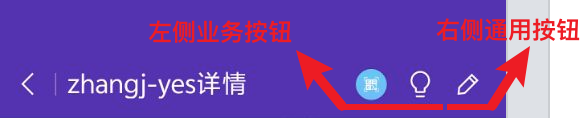
定制详情导航栏业务按钮
{
  event: 'detail.render.before',
  functional: function (pluginExecResult, options) {
    // 详情页页面渲染之前要执行的逻辑:定制详情导航栏业务按钮
    const navBusinessBtns = [
      {
        type: 'link', // 图标类型,如果要传入外部图标链接,必传 type: 'link'
        icon: 'https://a9.fspage.com/FSR/weex/avatar/object_detail/images/device-scan.png', // 外部图标链接
        api_name: 'Ai_button_default',
        onClick() {
          pluginExecResult.api.showToast('我是二维码按钮')
        }
      },
      {
        icon: 'fxui_all zhineng', // 字体图标
        api_name: 'zhineng_button_default',
        onClick() {
          pluginExecResult.api.showToast('我是智能按钮')
        }
      }
    ]

    return {
      navBusinessBtns
    }
  }
}
注意
- 该事件触发时机较早,
options.dataGetter还不可用。