

简体中文
配置步骤
该能⼒还在灰度测试期间,想要体验需要在灰度申请进⾏申请
⼀. 动作提⽰⽂案
1. 配置⽅式
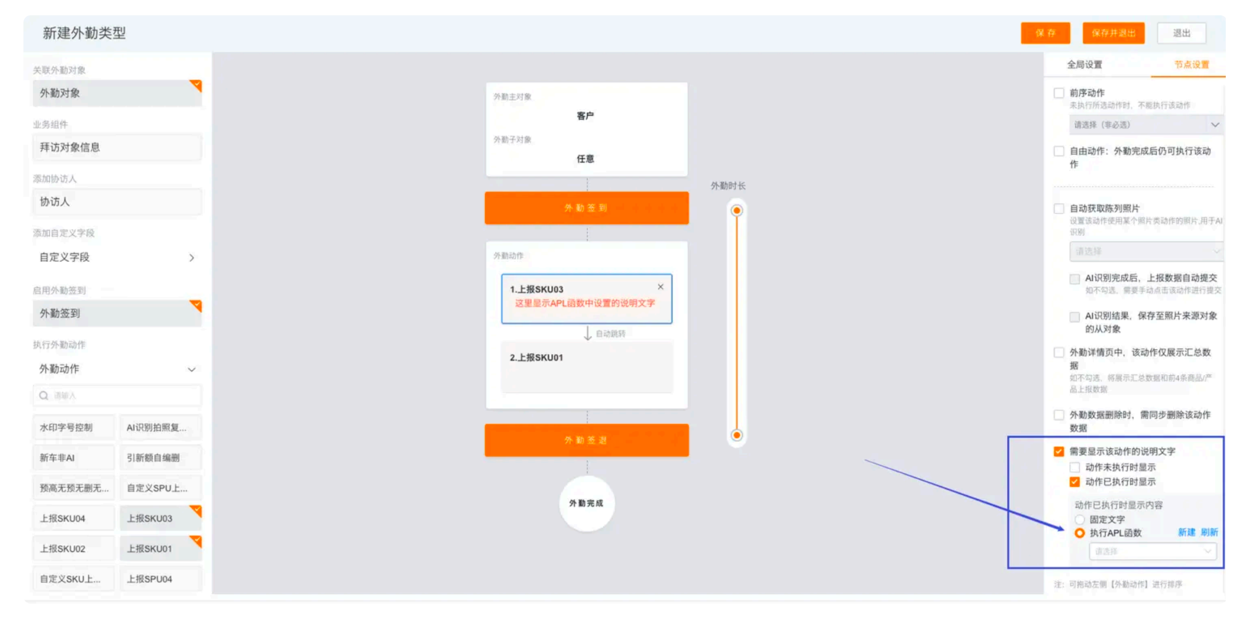
在类中每个动作的节点上都可以为这个动作配置不同的⽂案说明,执⾏不同的函数
2. 参数说明
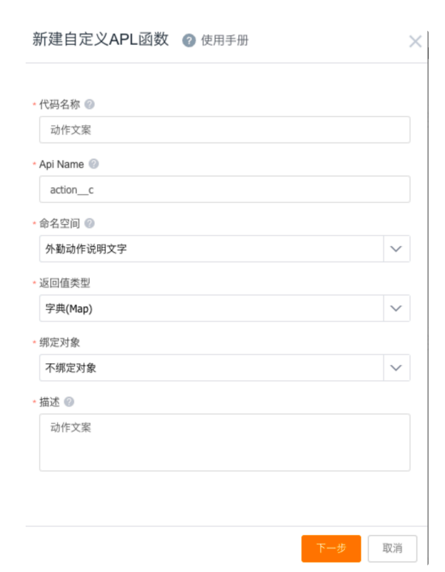
直接在类型中新建或者在 APL 后台管理中新建 APL 函数,选择外勤动作说明⽂字的命名空间 , 返回值是字典,将必填字段补充完整
选择空模版,然后必须在设置参数中增加⼀个参数
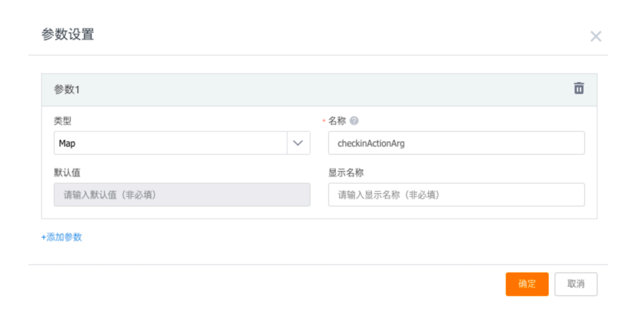
参数解释
//各个参数含义
String checkId = checkinActionArg.checkId as String//⾼级外勤对象的id
String mainObjApiName = checkinActionArg.mainObjApiName as String //⾼级外勤拜访主对象的apiName 可能为空
String mainObjDataId = checkinActionArg.mainObjDataId as String//⾼级外勤拜访主对象的数据id 可能为空
String execute = checkinActionArg.executed as String //两种状态 执⾏:executed 未执⾏:notExecuted
String actionId = checkinActionArg.actionId as String//⽤于处理不同动作的判断 若函数只适⽤⼀个动作则不需要此字段
String checkTypeId = checkinActionArg.checkTypeId as String//外勤类型id 当这个函数作⽤于不同类型时使⽤ 如果只适⽤⼀个类型,则不⽤此字段
String remake = checkinActionArg.remake as String //灰度ai翻拍之后才有的字段,默认都是不翻拍 不翻拍:noRemake 翻拍:remake
String relationApiName = checkinActionArg.relationApiName as String//⾃定义对象动作才会返回值 对应的对象apiName
String relationDataId = checkinActionArg.relationDataId as String //⾃定义对象动作才会返回值 对应的数据id
返回结果是⼀个 map,必须有两个值:
    //context 对应的⽂案
    //color ⽂案的颜色
    Map result = [:]
    result.put("context", "这个是提⽰⽂案")
    result.put("color", "0000FF")
    return result
3. 简单案例
--详见groovy代码示例