

简体中文
展示增强
当对象类页面的默认布局无法满足业务诉求时,可以通过“布局增强”的方式,在指定页面区域插入自定义组件,补充展示能力和交互能力。
典型场景例如:
- 在对象详情页增加经营分析卡片
- 在对象列表页增加辅助展示模块
- 在对象新建编辑页补充自定义表单区域
适用场景
适用于“对象类页面已经存在,但原有布局表达能力不足,需要增加自定义展示区块或交互模块”的场景。
适用页面
- 对象详情页
- 对象列表页
- 对象新建编辑页
什么时候适合做布局增强
如果你遇到下面这些需求,通常都适合优先考虑布局增强:
- 想在现有页面中增加新的展示区块
- 想插入图表、卡片、状态说明、外部嵌入内容
- 想把某些高频操作做成局部交互模块
- 想在不改动对象页整体结构的前提下增强信息表达
开发思路
布局增强通常可以拆成三步理解:
- 明确增强场景和目标区域
- 开发自定义组件
- 将组件发布并配置到目标页面中
开发流程
明确场景与组件目标
在开始之前,先确认以下问题:
- 组件要放在哪个页面
- 组件是做展示增强还是交互增强
- 组件需要哪些输入数据
- 组件是否需要与宿主页面交互
创建组件
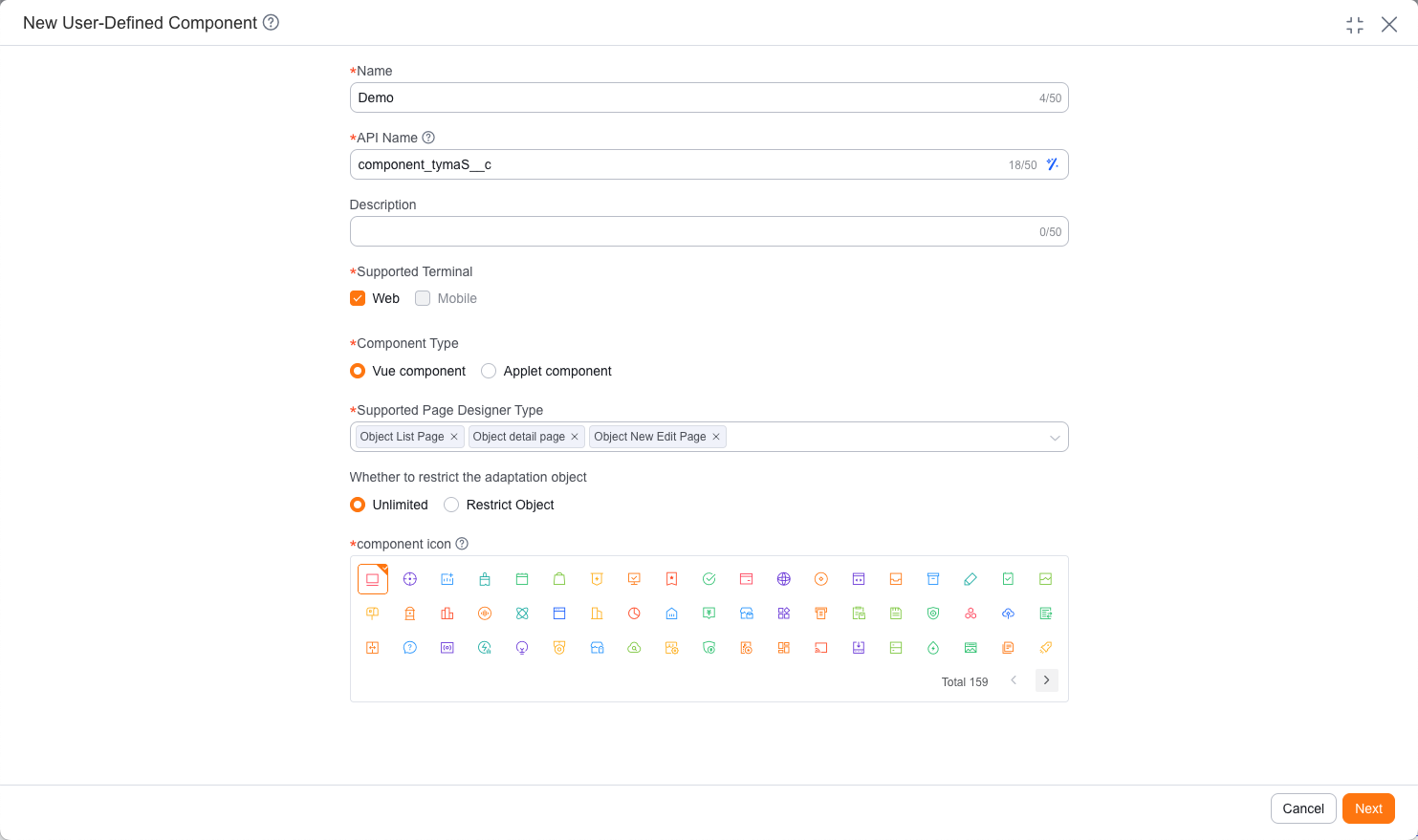
进入后台创建自定义组件,填写组件名称、支持终端、组件类型以及对象页面适用范围。
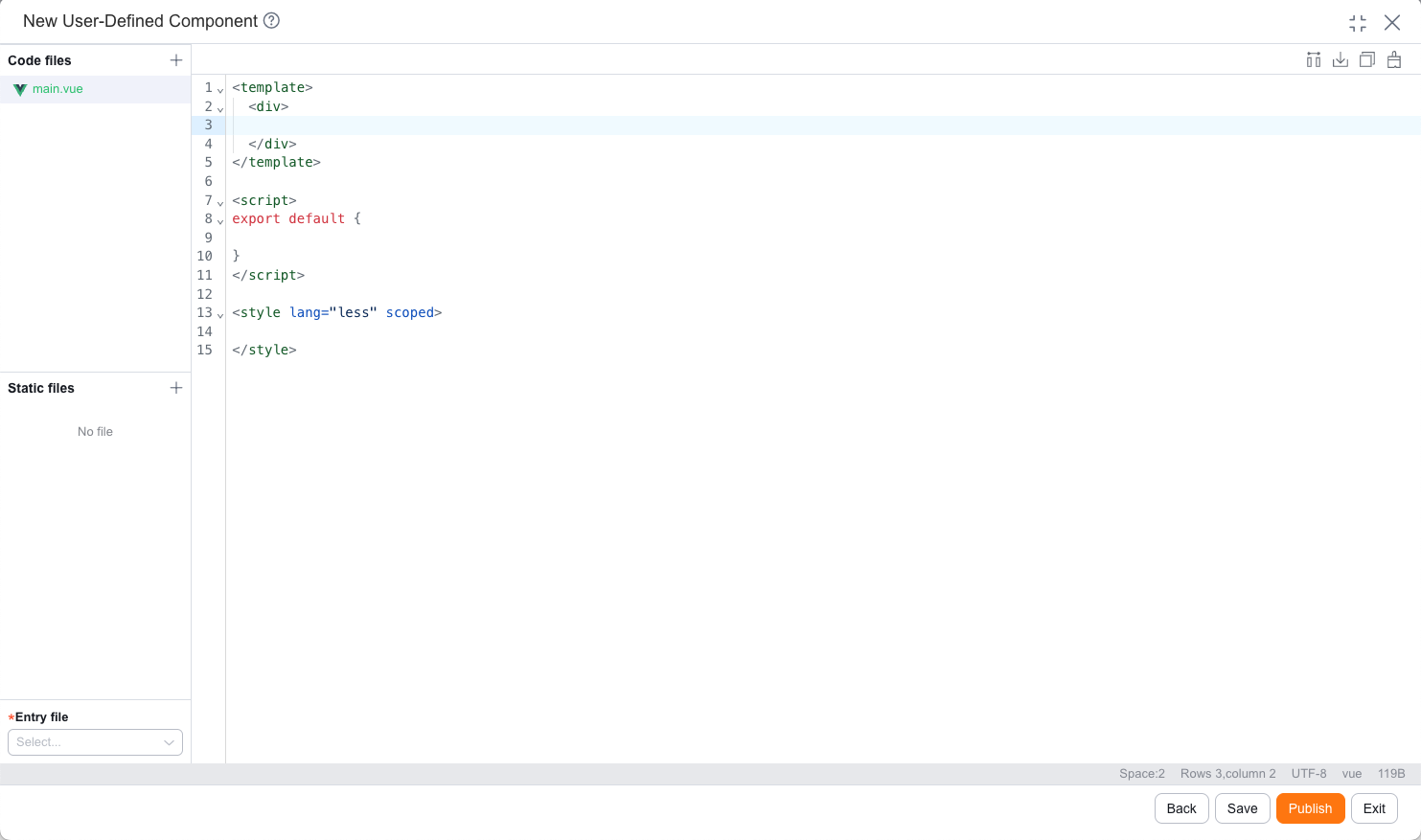
对于 Web 端,一般基于 Vue 2 组件方式开发;对于移动端,一般通过在线 IDE 开发小程序组件。
编写组件代码
组件开发时,优先实现以下内容:
- 页面结构(模板)
- 数据接收(属性 / 上下文)
- 交互行为(事件、回调)
- 样式展示
下面以一个“客户对象详情页摘要卡片”组件为例,展示 Web 端和移动端的基础写法。Web 端示例以
apiName、dataId为入参,通过 APL 函数获取客户数据后展示;移动端示例通过context.objectApiName和context.objectDataId获取当前详情记录标识,再加载组件所需数据。两端点击“查看跟进记录”时只向外抛出事件,不处理具体业务逻辑:移动端组件示例index.js
index.json
index.wxml
index.wxss
app.json
config.json
project.config.json
sitemap.json
import FxUI from 'fxui-mobile' Component({ properties: { // 对象详情页会通过 context 注入当前对象和记录 ID context: { type: Object, value: null } }, data: { record: {}, customerName: '未填写', ownerName: '未分配', lastFollowedTimeText: '暂无', nextFollowedRemark: '暂无' }, observers: { context(context) { const { objectApiName = '', objectDataId = '' } = context || {} this.loadRecord(objectApiName, objectDataId) } }, methods: { loadRecord(objectApiName, objectDataId) { if (!objectApiName || !objectDataId) { this.setRecord({}) return } // 示例 APL 函数按对象 API Name 和数据 ID 查询摘要字段 FxUI.userDefine.call_controller('customer_summary_card__c', [ { type: 'map', name: 'params', value: { object_api_name: objectApiName, object_id: objectDataId } } ]).then(res => { this.setRecord((res && res.Value) || {}) }) }, setRecord(record) { const owner = record.owner__r || {} this.setData({ record, customerName: record.name || '未填写', ownerName: owner.name || '未分配', lastFollowedTimeText: this.formatDate(record.last_followed_time) || '暂无', nextFollowedRemark: record.next_followed_remark || '暂无' }) }, formatDate(value) { if (!value) { return '' } const date = new Date(value) if (Number.isNaN(date.getTime())) { return '' } const year = date.getFullYear() const month = String(date.getMonth() + 1).padStart(2, '0') const day = String(date.getDate()).padStart(2, '0') const hour = String(date.getHours()).padStart(2, '0') const minute = String(date.getMinutes()).padStart(2, '0') return `${year}-${month}-${day} ${hour}:${minute}` }, handleViewFollowRecord() { this.triggerEvent('viewfollowrecord', { record: this.data.record }) } } }){ "component": true }<view class="customer-summary-card"> <view class="summary-header"> <view class="summary-title">{{customerName}}</view> </view> <view class="summary-row"> <text class="summary-label">负责人</text> <text class="summary-value">{{ownerName}}</text> </view> <view class="summary-row"> <text class="summary-label">最后跟进</text> <text class="summary-value">{{lastFollowedTimeText}}</text> </view> <view class="summary-next"> <view class="summary-label">下次跟进要点</view> <view class="summary-value">{{nextFollowedRemark}}</view> </view> <button class="summary-button" type="default" plain bindtap="handleViewFollowRecord"> 查看跟进记录 </button> </view>.customer-summary-card { margin: 16rpx; padding: 32rpx; border: 1rpx solid #e5e6eb; border-radius: 8rpx; background: #fff; } .summary-header { margin-bottom: 28rpx; } .summary-title { min-width: 0; color: #181c25; font-size: 32rpx; font-weight: 600; overflow: hidden; text-overflow: ellipsis; white-space: nowrap; } .summary-row { display: flex; justify-content: space-between; margin-top: 16rpx; } .summary-next { margin-top: 20rpx; } .summary-label { color: #7a8191; font-size: 26rpx; } .summary-value { color: #181c25; font-size: 26rpx; line-height: 1.5; word-break: break-all; } .summary-button { width: 100%; height: 68rpx; margin-top: 28rpx; border: 1rpx solid #2468f2; border-radius: 8rpx; color: #2468f2; background: #fff; font-size: 26rpx; line-height: 68rpx; }{ "pages": [], "sitemapLocation": "sitemap.json" }{ "components": { "root": "components/customer-summary-card/index" }, "main": "" }{ "miniprogramAvaId": "fsdemo-lego", "avaFrameVer": "770.0.4", "description": "项目配置文件", "packOptions": { "ignore": [] }, "setting": { "urlCheck": true, "scopeDataCheck": false, "coverView": true, "es6": true, "postcss": true, "compileHotReLoad": false, "preloadBackgroundData": false, "minified": true, "autoAudits": false, "newFeature": false, "uglifyFileName": false, "uploadWithSourceMap": true, "useIsolateContext": true, "nodeModules": false, "enhance": false, "useCompilerModule": true, "userConfirmedUseCompilerModuleSwitch": false, "useMultiFrameRuntime": true, "useApiHook": true, "useApiHostProcess": true, "showShadowRootInWxmlPanel": true, "packNpmManually": false, "packNpmRelationList": [], "minifyWXSS": true }, "compileType": "miniprogram", "libVersion": "2.15.0", "appid": "wxb7ca92fe07ce5c66", "projectname": "legodemo", "debugOptions": { "hidedInDevtools": [] }, "scripts": { "beforeCompile": "" }, "isGameTourist": false, "condition": { "search": { "list": [] }, "conversation": { "list": [] }, "game": { "list": [] }, "plugin": { "list": [] }, "gamePlugin": { "list": [] }, "miniprogram": { "list": [] } } }{ "desc": "关于本文件的更多信息,请参考文档 https://developers.weixin.qq.com/miniprogram/dev/framework/sitemap.html", "rules": [ { "action": "allow", "page": "*" } ] }Web 端组件示例Main.vue
<template>
    <div class="customer-summary-card">
        <div class="summary-header">
            <div class="summary-title">{{ record.name || '未填写' }}</div>
        </div>

        <div class="summary-row">
            <span class="summary-label">负责人</span>
            <span class="summary-value">{{ ownerName }}</span>
        </div>

        <div class="summary-row">
            <span class="summary-label">最后跟进</span>
            <span class="summary-value">{{ formatDate(record.last_followed_time) || '暂无' }}</span>
        </div>

        <div class="summary-next">
            <div class="summary-label">下次跟进要点</div>
            <div class="summary-value">{{ record.next_followed_remark || '暂无' }}</div>
        </div>

        <button class="summary-button" type="button" @click="handleViewFollowRecord">
            查看跟进记录
        </button>
    </div>
</template>

<script>
export default {
    name: 'CustomerSummaryCard',
    props: {
        // 对象详情页通过 data 传入当前对象信息
        data: {
            type: Object,
            default: function() {
                return {}
            }
        }
    },
    data() {
        return {
            record: {}
        }
    },
    mounted() {
        this.loadRecord()
    },
    computed: {
        ownerName() {
            const owner = this.record.owner__r || {}
            return owner.name || '未分配'
        }
    },
    methods: {
        loadRecord() {
            if (!this.data.object_api_name || !this.data.object_id) {
                this.record = {}
                return
            }

            // 示例:调用 APL 控制器查询当前记录摘要信息
            FxUI.userDefine.call_controller('customer_summary_card__c', [
                {
                    type: 'map',
                    name: 'params',
                    value: {
                        object_api_name: this.data.object_api_name,
                        object_id: this.data.object_id
                    }
                }
            ]).then(res => {
                this.record = (res && res.Value) || {}
            })
        },
        formatDate(value) {
            if (!value) {
                return ''
            }

            const date = new Date(value)

            if (Number.isNaN(date.getTime())) {
                return ''
            }

            const year = date.getFullYear()
            const month = String(date.getMonth() + 1).padStart(2, '0')
            const day = String(date.getDate()).padStart(2, '0')
            const hour = String(date.getHours()).padStart(2, '0')
            const minute = String(date.getMinutes()).padStart(2, '0')

            return `${year}-${month}-${day} ${hour}:${minute}`
        },
        handleViewFollowRecord() {
            this.$emit('view-follow-record', this.record)
        }
    }
}
</script>

<style scoped>
.customer-summary-card {
    padding: 16px;
    border: 1px solid #e5e6eb;
    border-radius: 4px;
    background: #fff;
}

.summary-header {
    margin-bottom: 14px;
}

.summary-title {
    min-width: 0;
    color: #181c25;
    font-size: 16px;
    font-weight: 600;
    overflow: hidden;
    text-overflow: ellipsis;
    white-space: nowrap;
}

.summary-row {
    display: flex;
    justify-content: space-between;
    margin-top: 8px;
}

.summary-next {
    margin-top: 10px;
}

.summary-label {
    color: #7a8191;
    font-size: 13px;
}

.summary-value {
    color: #181c25;
    font-size: 13px;
    line-height: 1.5;
}

.summary-button {
    width: 100%;
    height: 34px;
    margin-top: 14px;
    border: 1px solid #2468f2;
    border-radius: 4px;
    color: #2468f2;
    background: #fff;
    cursor: pointer;
}
</style>
移动端对象详情页会通过组件的
context属性传入当前对象和记录 ID,示例中只使用context.objectApiName和context.objectDataId。不要把context.api_name当作业务对象 API Name,也不要使用dataId作为移动端记录 ID。发布并配置到页面
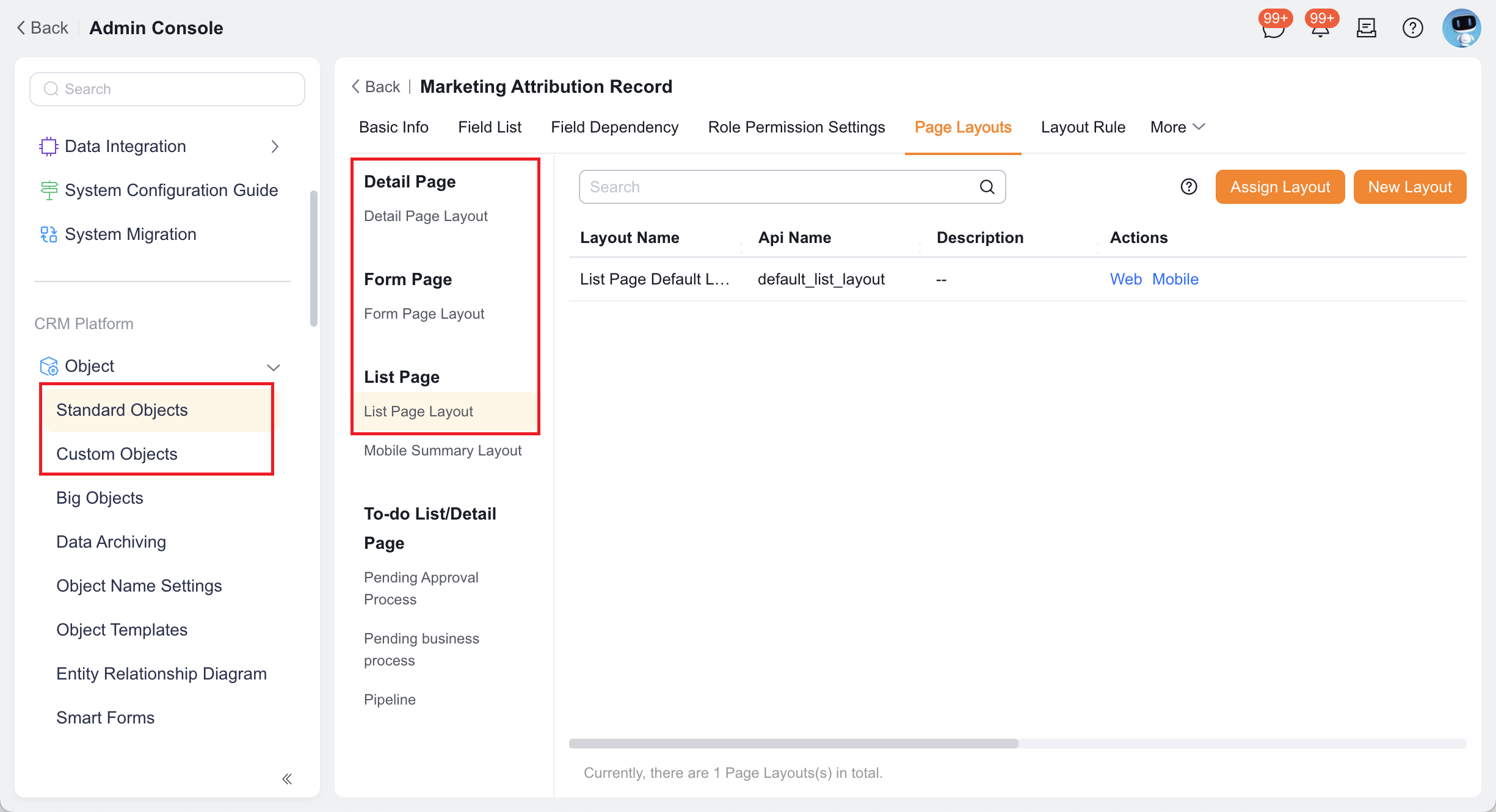
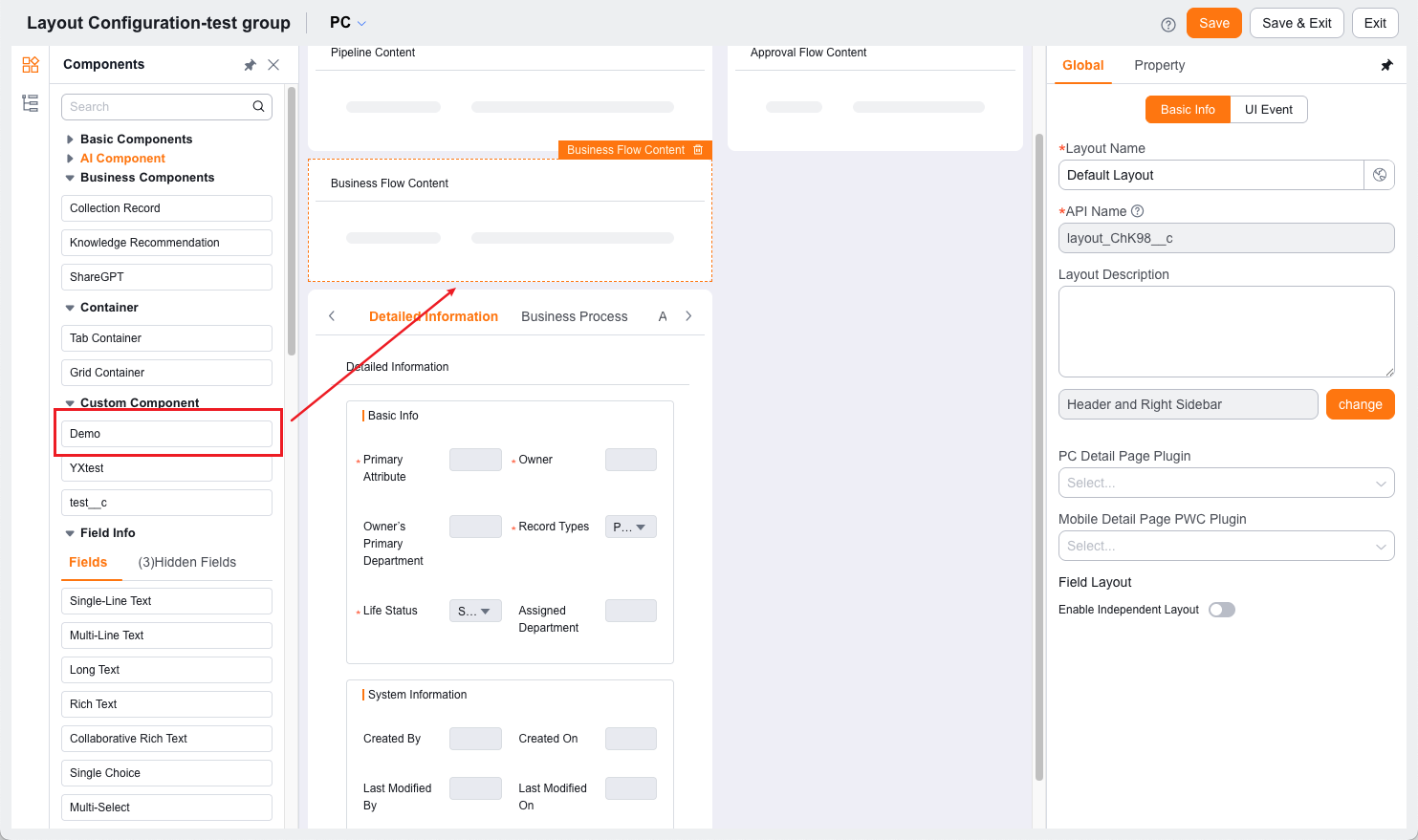
开发完成后,将组件发布,并在目标页面设计器或场景配置中挂载到对应区域。
在线预览与调试
- 移动端:通过在线 IDE 右上角的「预览」按钮查看效果
- Web 端:通过本地开发环境与浏览器调试工具查看效果
推荐入口
常见问题
Q:什么时候应该用布局增强,而不是直接改插件?
如果你的目标主要是“新增一块展示内容或局部交互模块”,优先考虑布局增强。
如果你的目标是“修改宿主页面原有内容和行为”,优先考虑插件。
Q:布局增强适合做复杂业务页面吗?
适合,但建议将复杂页面拆成多个组件,而不是把所有逻辑堆到一个组件里。
Q:布局增强和自定义页面有什么关系?
布局增强更适合在已有对象页面中“补一块内容”;如果你需要从零组织整个页面,通常就不属于当前对象类场景了。