

English
Layout Enhancement
When the default layout of an object-related page cannot meet business requirements, you can use layout enhancement to insert custom components into specific page areas and add display and interaction capabilities.
Typical scenarios include:
- Add business analysis cards to an object detail page
- Add auxiliary display modules to an object list page
- Add custom form areas to an object create/edit page
Applicable Scenarios
This approach is suitable when an object-related page already exists, but its original layout and presentation capabilities are insufficient and additional custom display blocks or interaction modules are needed.
Applicable Pages
- Object detail pages
- Object list pages
- Object create/edit pages
When to Use Layout Enhancement
If you encounter the following requirements, layout enhancement is usually the preferred option:
- You want to add new display blocks to an existing page
- You want to insert charts, cards, status descriptions, or externally embedded content
- You want to turn certain high-frequency actions into local interaction modules
- You want to improve information presentation without changing the overall structure of the object page
Development Approach
Layout enhancement can usually be understood in three steps:
- Identify the enhancement scenario and the target area
- Develop the custom component
- Publish the component and configure it on the target page
Development Workflow
Clarify the Scenario and Component Goal
Before you begin, confirm the following:
- Which page will the component be placed on?
- Is the component for display enhancement or interaction enhancement?
- What input data does the component need?
- Does the component need to interact with the host page?
Create the Component
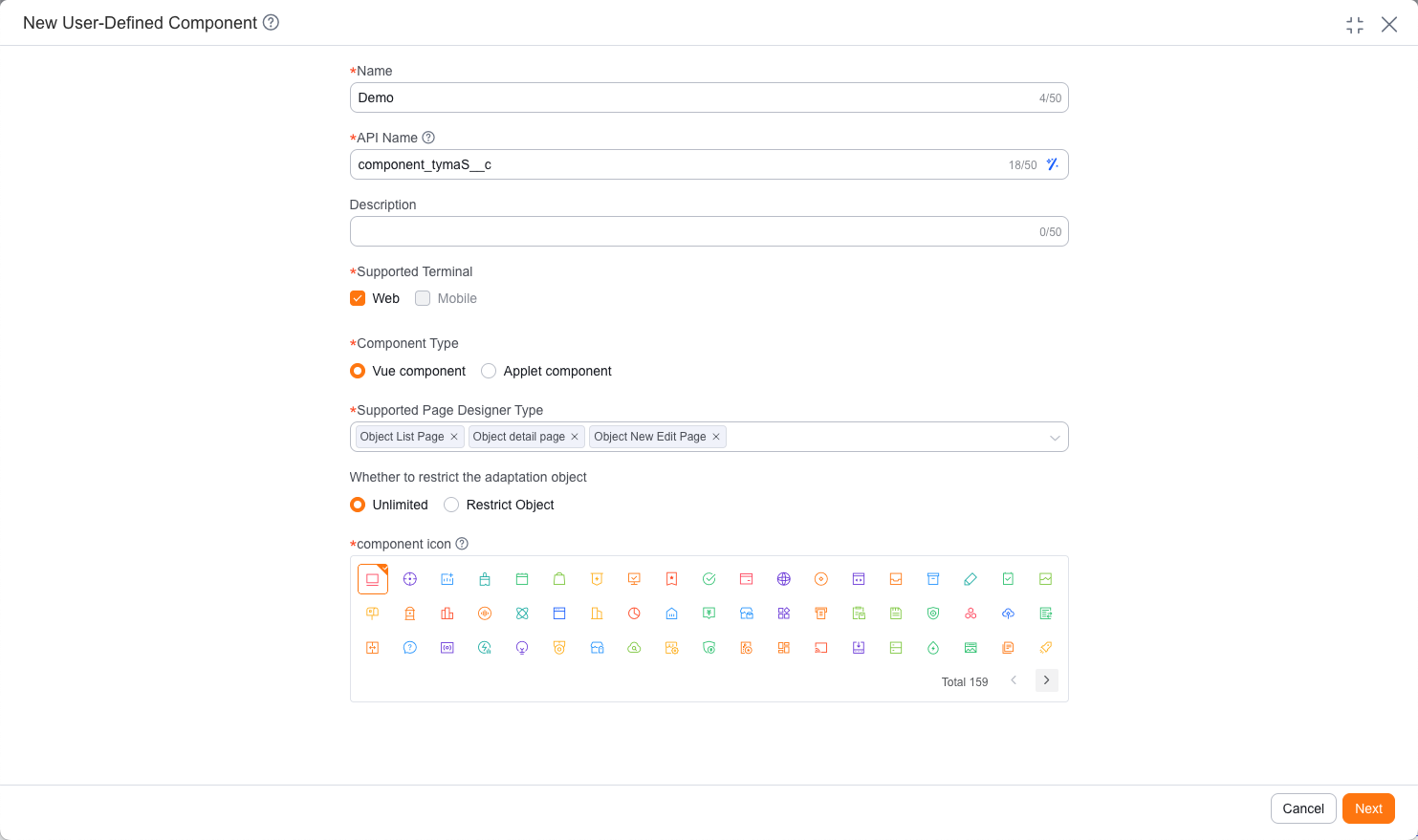
Go to the admin console to create a custom component and fill in the component name, supported terminal, component type, and the applicable scope for object pages.
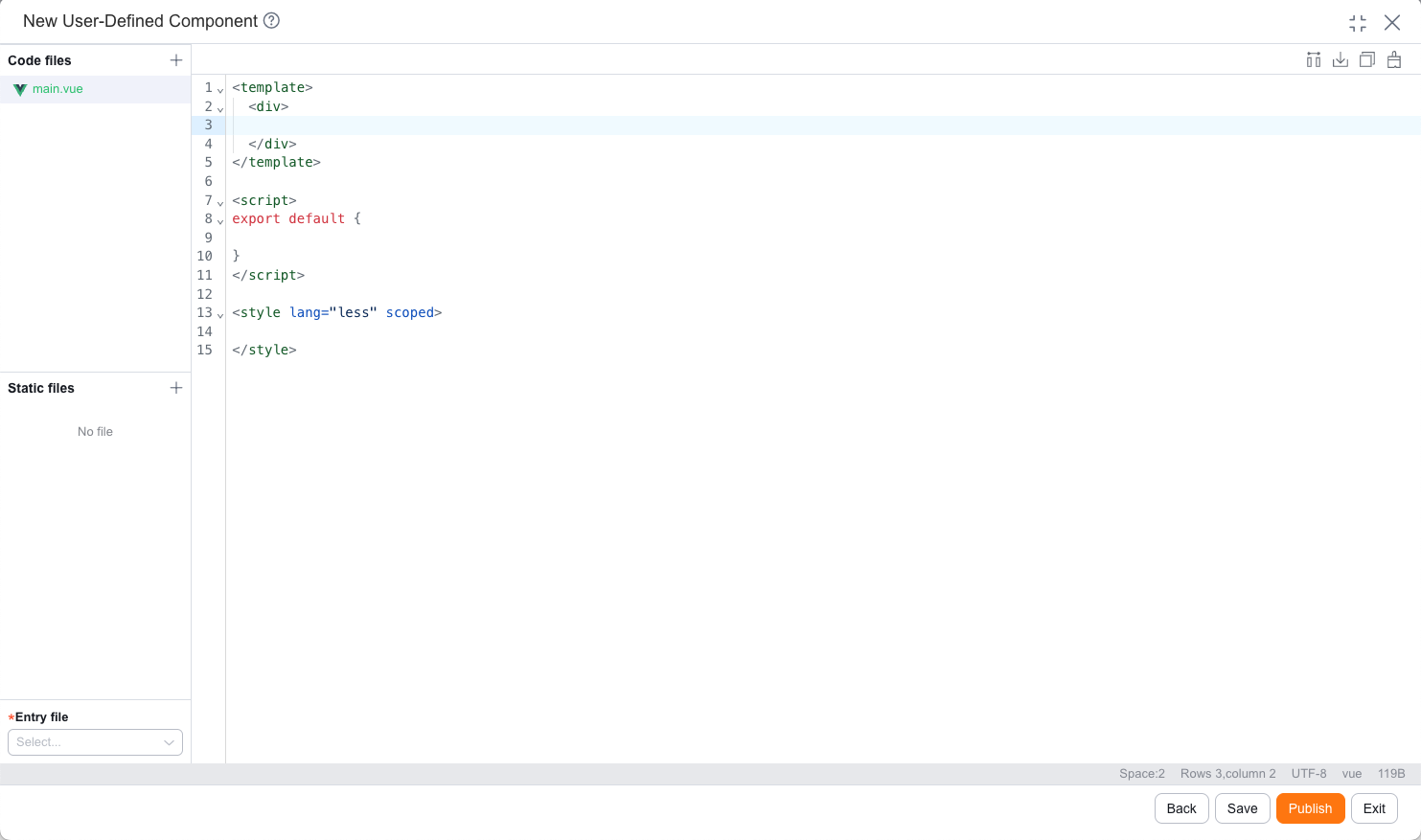
On the Web side, components are generally developed as Vue 2 components. On the mobile side, mini program components are generally developed in the online IDE.
Write the Component Code
During component development, prioritize the following:
- Page structure (template)
- Data input (properties / context)
- Interaction behavior (events and callbacks)
- Style presentation
The following example uses a "customer detail summary card" component to show the basic implementation for both Web and mobile. The Web example receives
apiNameanddataId, then calls an APL function to fetch customer data. The mobile example reads the current detail record identity fromcontext.objectApiNameandcontext.objectDataId, then loads the data needed by the component. Both examples only display data and emit a "view follow-up records" event, without handling business logic:MobileComponent Exampleindex.js
index.json
index.wxml
index.wxss
app.json
config.json
project.config.json
sitemap.json
import FxUI from 'fxui-mobile' Component({ properties: { // The object detail page injects the current object and record ID through context context: { type: Object, value: null } }, data: { record: {}, customerName: 'Not filled', ownerName: 'Unassigned', lastFollowedTimeText: 'None', nextFollowedRemark: 'None' }, observers: { context(context) { const { objectApiName = '', objectDataId = '' } = context || {} this.loadRecord(objectApiName, objectDataId) } }, methods: { loadRecord(objectApiName, objectDataId) { if (!objectApiName || !objectDataId) { this.setRecord({}) return } // Example APL function queries summary fields by object API name and data ID FxUI.userDefine.call_controller('customer_summary_card__c', [ { type: 'map', name: 'params', value: { object_api_name: objectApiName, object_id: objectDataId } } ]).then(res => { this.setRecord((res && res.Value) || {}) }) }, setRecord(record) { const owner = record.owner__r || {} this.setData({ record, customerName: record.name || 'Not filled', ownerName: owner.name || 'Unassigned', lastFollowedTimeText: this.formatDate(record.last_followed_time) || 'None', nextFollowedRemark: record.next_followed_remark || 'None' }) }, formatDate(value) { if (!value) { return '' } const date = new Date(value) if (Number.isNaN(date.getTime())) { return '' } const year = date.getFullYear() const month = String(date.getMonth() + 1).padStart(2, '0') const day = String(date.getDate()).padStart(2, '0') const hour = String(date.getHours()).padStart(2, '0') const minute = String(date.getMinutes()).padStart(2, '0') return `${year}-${month}-${day} ${hour}:${minute}` }, handleViewFollowRecord() { this.triggerEvent('viewfollowrecord', { record: this.data.record }) } } }){ "component": true }<view class="customer-summary-card"> <view class="summary-header"> <view class="summary-title">{{customerName}}</view> </view> <view class="summary-row"> <text class="summary-label">Owner</text> <text class="summary-value">{{ownerName}}</text> </view> <view class="summary-row"> <text class="summary-label">Last follow-up</text> <text class="summary-value">{{lastFollowedTimeText}}</text> </view> <view class="summary-next"> <view class="summary-label">Next follow-up notes</view> <view class="summary-value">{{nextFollowedRemark}}</view> </view> <button class="summary-button" type="default" plain bindtap="handleViewFollowRecord"> View follow-up records </button> </view>.customer-summary-card { margin: 16rpx; padding: 32rpx; border: 1rpx solid #e5e6eb; border-radius: 8rpx; background: #fff; } .summary-header { margin-bottom: 28rpx; } .summary-title { min-width: 0; color: #181c25; font-size: 32rpx; font-weight: 600; overflow: hidden; text-overflow: ellipsis; white-space: nowrap; } .summary-row { display: flex; justify-content: space-between; margin-top: 16rpx; } .summary-next { margin-top: 20rpx; } .summary-label { color: #7a8191; font-size: 26rpx; } .summary-value { color: #181c25; font-size: 26rpx; line-height: 1.5; word-break: break-all; } .summary-button { width: 100%; height: 68rpx; margin-top: 28rpx; border: 1rpx solid #2468f2; border-radius: 8rpx; color: #2468f2; background: #fff; font-size: 26rpx; line-height: 68rpx; }{ "pages": [], "sitemapLocation": "sitemap.json" }{ "components": { "root": "components/customer-summary-card/index" }, "main": "" }{ "description": "object layout enhance example", "setting": { "es6": true, "postcss": true, "minified": true }, "compileType": "miniprogram" }{ "rules": [] }WebComponent ExampleMain.vue
<template>
    <div class="customer-summary-card">
        <div class="summary-header">
            <div class="summary-title">{{ record.name || 'Not filled' }}</div>
        </div>

        <div class="summary-row">
            <span class="summary-label">Owner</span>
            <span class="summary-value">{{ ownerName }}</span>
        </div>

        <div class="summary-row">
            <span class="summary-label">Last follow-up</span>
            <span class="summary-value">{{ formatDate(record.last_followed_time) || 'None' }}</span>
        </div>

        <div class="summary-next">
            <div class="summary-label">Next follow-up notes</div>
            <div class="summary-value">{{ record.next_followed_remark || 'None' }}</div>
        </div>

        <button class="summary-button" type="button" @click="handleViewFollowRecord">
            View follow-up records
        </button>
    </div>
</template>

<script>
export default {
    name: 'CustomerSummaryCard',
    props: {
        // The object detail page passes in the current object API name and data ID
        apiName: {
            type: String,
            default: ''
        },
        dataId: {
            type: String,
            default: ''
        }
    },
    data() {
        return {
            record: {}
        }
    },
    mounted() {
        this.loadRecord()
    },
    computed: {
        ownerName() {
            const owner = this.record.owner__r || {}
            return owner.name || 'Unassigned'
        }
    },
    methods: {
        loadRecord() {
            if (!this.apiName || !this.dataId) {
                this.record = {}
                return
            }

            // Example APL function queries summary fields by object API name and data ID
            FxUI.userDefine.call_controller('customer_summary_card__c', [
                {
                    type: 'map',
                    name: 'params',
                    value: {
                        object_api_name: this.apiName,
                        object_id: this.dataId
                    }
                }
            ]).then(res => {
                this.record = (res && res.Value) || {}
            })
        },
        formatDate(value) {
            if (!value) {
                return ''
            }

            const date = new Date(value)

            if (Number.isNaN(date.getTime())) {
                return ''
            }

            const year = date.getFullYear()
            const month = String(date.getMonth() + 1).padStart(2, '0')
            const day = String(date.getDate()).padStart(2, '0')
            const hour = String(date.getHours()).padStart(2, '0')
            const minute = String(date.getMinutes()).padStart(2, '0')

            return `${year}-${month}-${day} ${hour}:${minute}`
        },
        handleViewFollowRecord() {
            this.$emit('view-follow-record', this.record)
        }
    }
}
</script>

<style scoped>
.customer-summary-card {
    padding: 16px;
    border: 1px solid #e5e6eb;
    border-radius: 4px;
    background: #fff;
}

.summary-header {
    margin-bottom: 14px;
}

.summary-title {
    min-width: 0;
    color: #181c25;
    font-size: 16px;
    font-weight: 600;
    overflow: hidden;
    text-overflow: ellipsis;
    white-space: nowrap;
}

.summary-row {
    display: flex;
    justify-content: space-between;
    margin-top: 8px;
}

.summary-next {
    margin-top: 10px;
}

.summary-label {
    color: #7a8191;
    font-size: 13px;
}

.summary-value {
    color: #181c25;
    font-size: 13px;
    line-height: 1.5;
}

.summary-button {
    width: 100%;
    height: 34px;
    margin-top: 14px;
    border: 1px solid #2468f2;
    border-radius: 4px;
    color: #2468f2;
    background: #fff;
    cursor: pointer;
}
</style>
On mobile object detail pages, the current object and record ID are passed through the component's
contextproperty. The example only usescontext.objectApiNameandcontext.objectDataId. Do not usecontext.api_nameas the business object API name, and do not usedataIdas the mobile record ID.Publish and Configure It on the Page
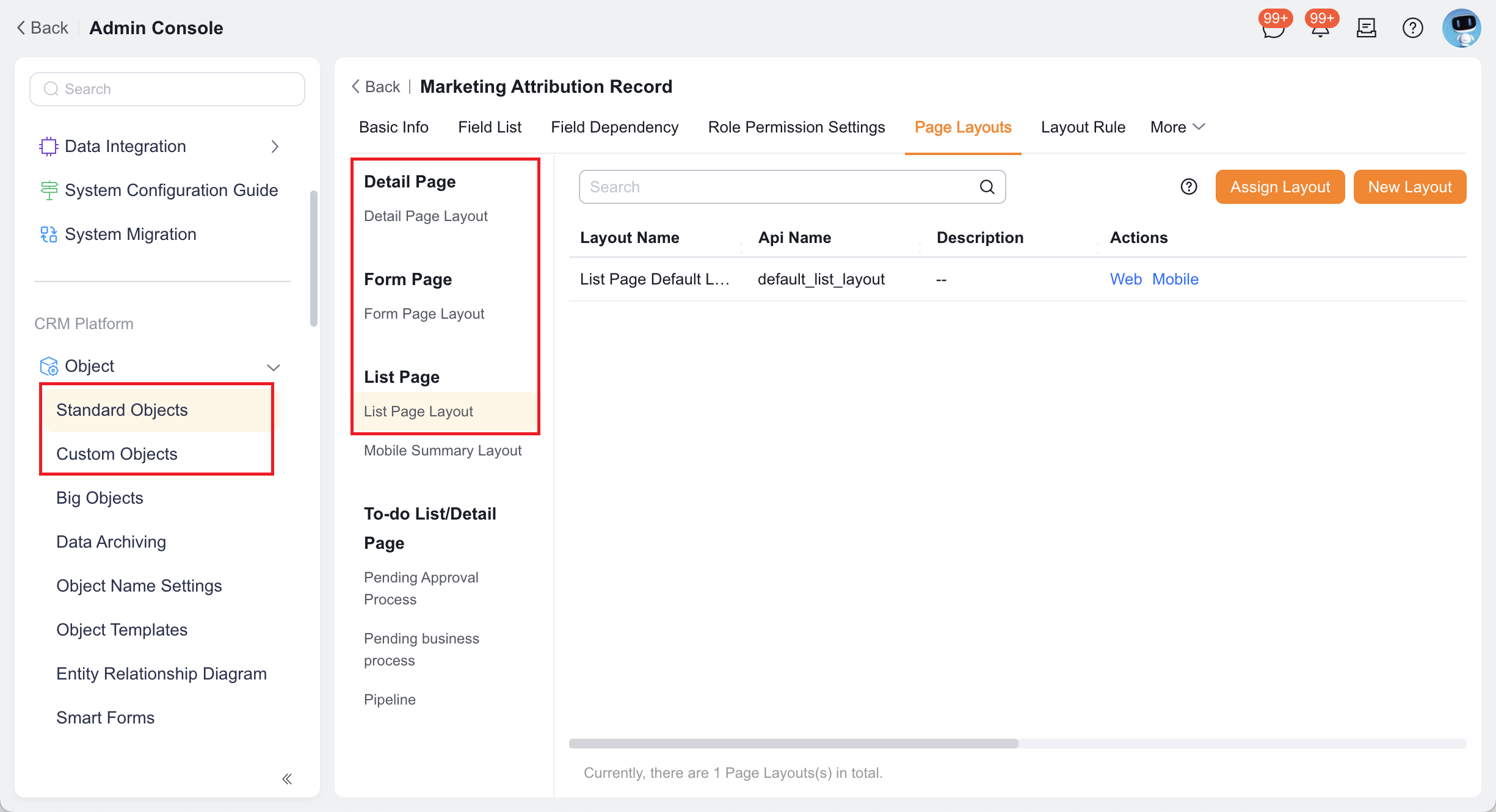
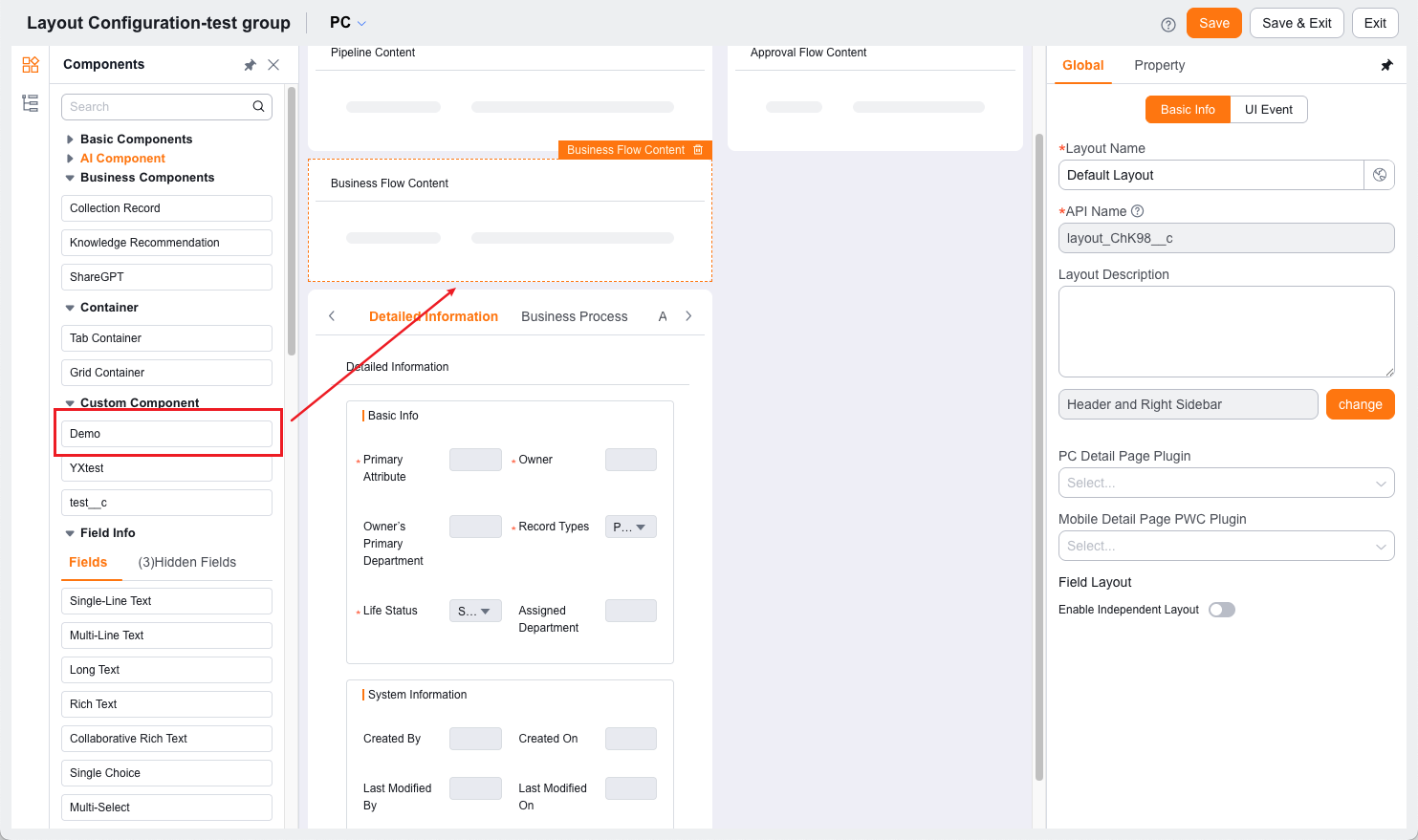
After development is complete, publish the component and mount it in the corresponding area through the target page designer or scenario configuration.
Online Preview and Debugging
- Mobile: use the Preview button in the upper-right corner of the online IDE to view the result
- Web: use the local development environment and browser debugging tools to inspect the result
Recommended Entries
FAQ
Q: When should I use layout enhancement instead of directly modifying a plugin?
If your goal is mainly to add a new display block or a local interaction module, prefer layout enhancement.
If your goal is to modify the existing content and behavior of the host page, prefer plugins.
Q: Is layout enhancement suitable for complex business pages?
Yes, but it is recommended to split a complex page into multiple components instead of putting all logic into a single component.
Q: What is the relationship between layout enhancement and custom pages?
Layout enhancement is more suitable for adding a block of content to an existing object page. If you need to organize an entire page from scratch, that usually falls outside the current object-page scenario.
Next Step
- To further distinguish between components and plugins, see the Component Guide and the Plugin Guide