

English
FxLogin
Used for a platform custom login page.
This component works with a custom domain name to allow enterprises to flexibly modify the style and login methods of the login page.
Parameters
| Parameter | Description | Type | Optional Values | Default |
|---|---|---|---|---|
| qrcode | Whether to show the QR code login tab | Boolean | — | true |
| account | Whether to show the account login tab | Boolean | — | true |
| more | Whether to show the More Login tab | Boolean | — | true |
| activeTabIndex | The tab index activated by default | Number | — | 0 |
| accountLoginTypes | Login methods available under the account login tab | Array | phone | ['phone', 'email', 'account'] |
| activeLoginType | The default login method shown in the account login tab | String | — | 'phone' |
| moreLoginTypes | Adds login methods under More Login | Array | [] | |
| changePasswordTypes | Whether phone and email login should show the Forgot Password button | Array | 'phone' | 'email' | ['phone', 'email'] |
| lang | Login page language | String | 'zh-CN' | 'zh-TW' | 'en' | 'zh-CN' |
| locationOrigin | Custom domain used to send network requests, such as verification code and login APIs | String | — | For custom domains like xxx.my.fxiaoke.com, the default is www.fxiaoke.comFor personalized domains like xxx.xx.xx, the default is location.hostname |
| twoFactor | Whether to enable two-factor login | Boolean | — | false |
| themeColor | Theme color of the login component | String | — | '#ff8000' |
| showAgreement | Whether to show the login agreement | Boolean | — | true |
| filterEnterpriseList | Called before rendering the enterprise list to filter enterprise data | Function(data: array) | — | null |
Description of the moreLoginType parameter
| Property | Description | Type | Optional Values | Default |
|---|---|---|---|---|
| name | Name of the custom login item | String | — | — |
| logo | Logo on the left side of the custom login item | String | — | — |
| href | URL to navigate to after clicking the custom login item | String | — | — |
| style | Style of the custom More Login item | String | — | — |
Description of the filterEnterpriseList callback
Called after entering the correct account and password and clicking Confirm, but before the enterprise list is rendered. It can be used to filter enterprise data.
The hook accepts one parameter:
data: Array- enterprise list data
After execution, make sure to return a data value.
| Property | Description | Type | Optional Values | Default |
|---|---|---|---|---|
| enterpriseName | Enterprise name | String | — | — |
| employeeStatus | Current status of the account in the enterprise: 1 Active, 2 Disabled, 3 Login forbidden, 4 Under review | Number | — | — |
| isNeedScanQRCode | Whether QR code login is required | Boolean | — | — |
| type | Enterprise type: 1 upstream enterprise, 2 downstream enterprise | Number | 1 | 2 | — |
| downloadEnterprise | Downstream enterprises of the upstream enterprise | Array | — |
Code Example
The component is globally registered through Vue.component and can be used directly in code.
<template>
    <div class="wrapper">
        <div class="login-wrapper">
            <fx-login></fx-login>
        </div>
    </div>
</template>
<script>
export default {};
</script>
<style lang="less" scoped>
.wrapper {
    width: 100vw;
    height: 100vh;
    display: flex;
    align-items: center;
    justify-content: center;
    .login-wrapper {
        padding: 16px;
        border-radius: 4px;
        background-color: #fff;
  }
}
</style>
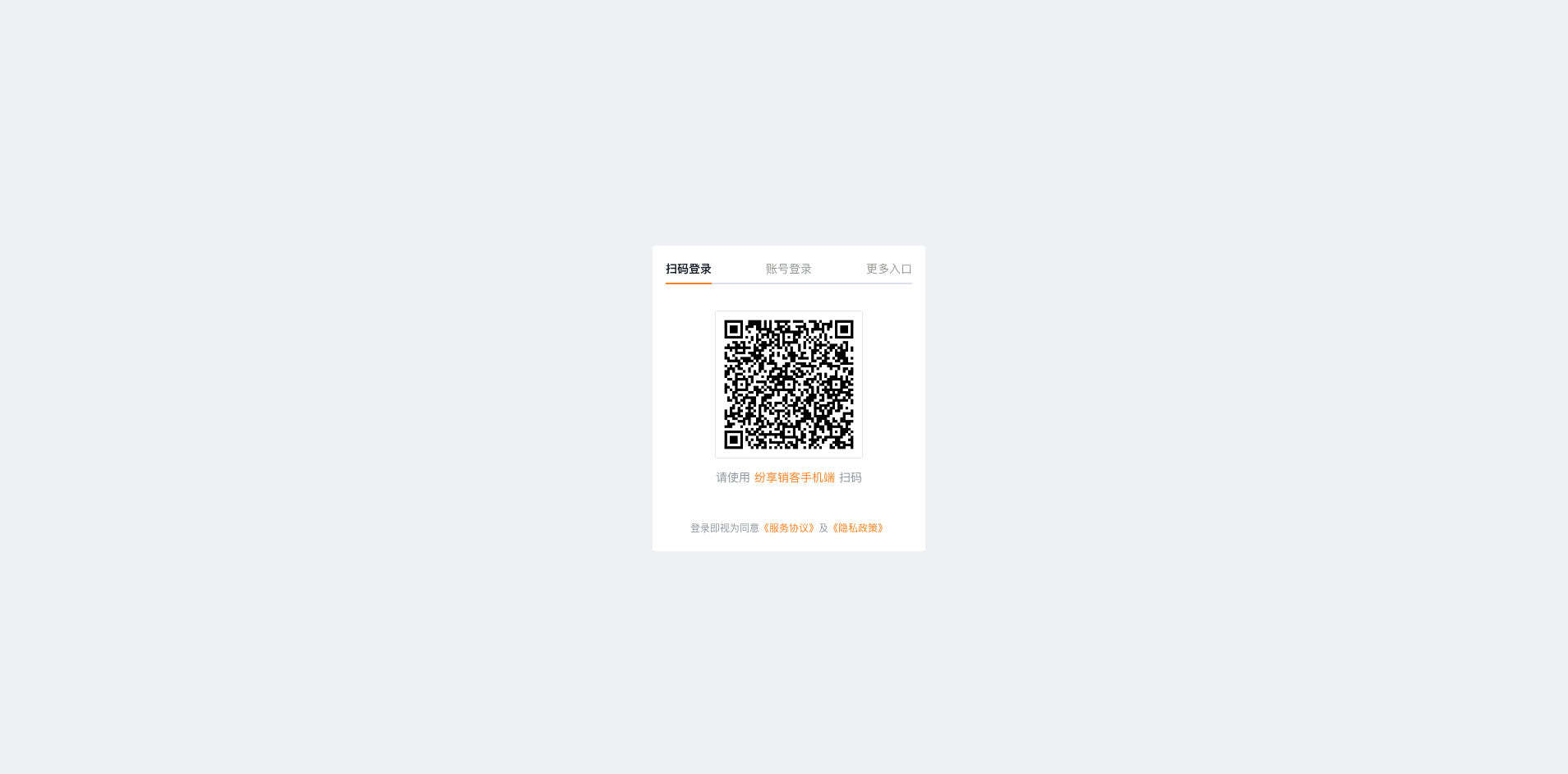
Display effect:
FAQ
Why can't I use FxUI components?
Other UI components cannot be used on the login page. The login component does not include various internal site dependencies, and user identity is not available before login, so FxUI components cannot be used inside the login component.
Why can't fx-login be used inside the main site?
The fx-login component performs automatic login. Since the main site can already obtain user identity, the login component will log in automatically.
Why do static resources fail to load?
Because the login component needs to work with a custom domain name, static resources cannot be loaded correctly under the custom domain.
Solution for custom domains: use https://www.fxiaoke.com
data() {
    return {
       logoImage: `https.www.fxiaoke.com${$publicPath$}logo.png`,
    }
},
Solution for private domains: use location.origin
data() {
    return {
       logoImage: location.origin + `${$publicPath$}logo.png`,
    }
},