

English
Embed a Third-Party Application
Today, many enterprises already have their own internal systems. While using Fxiaoke CRM, they also want direct access to those internal systems. This article provides a best-practice example for embedding a third-party application.
Sequence Diagram
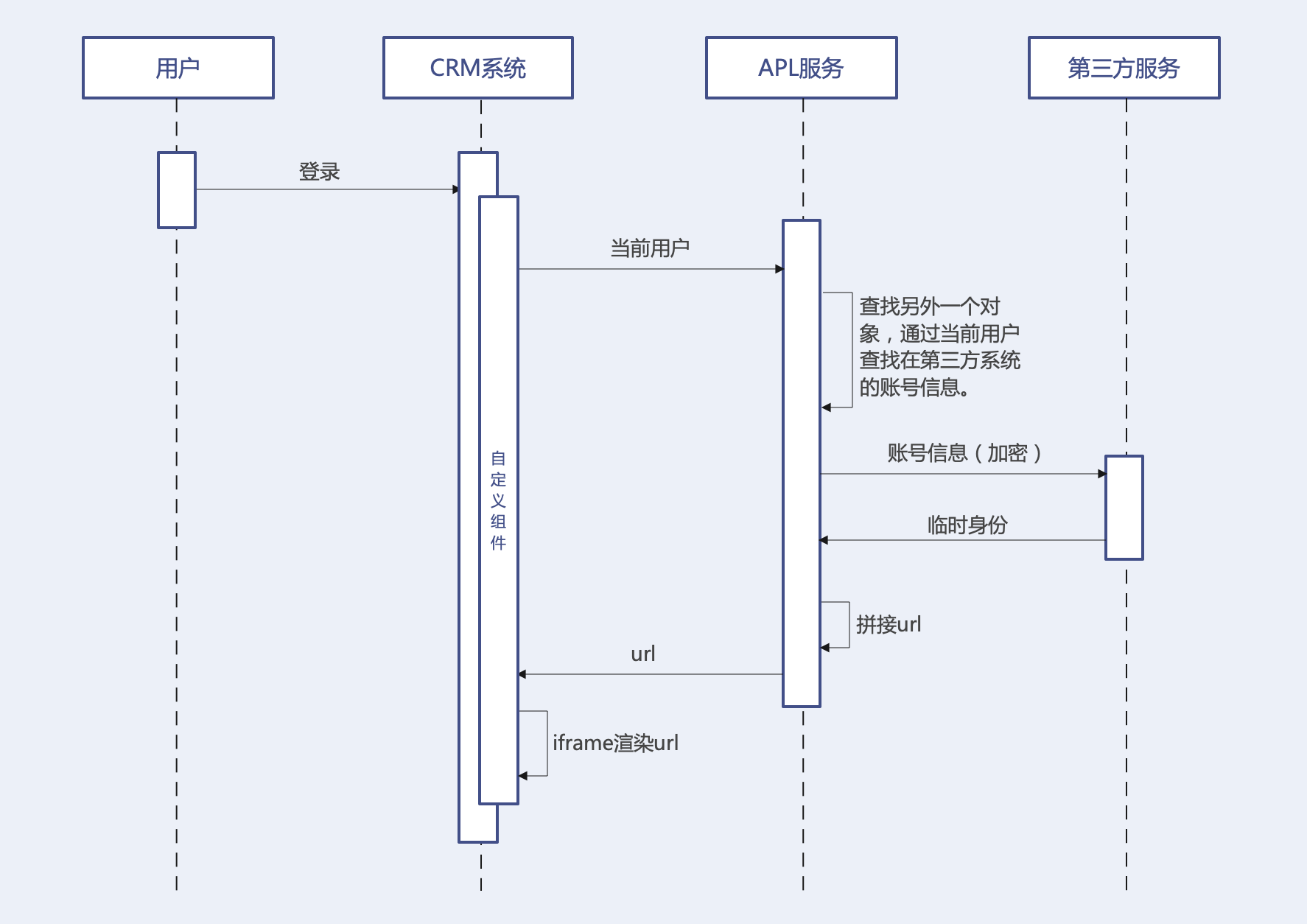
Encryption rules must be agreed upon in advance by both parties to avoid unnecessary security issues.
Integration Requirements
Before development, you also need to confirm whether the third-party system meets the following conditions:
- It uses the
HTTPSprotocol. - The
x-frame-optionresponse header is set toDENYorALLOW-FROM https://www.fxiaoke.com/. - The
samesiteattribute inset-cookieis set toNone.
iframe Usage Issues provides additional explanation.
Development Code
APL Function
Implementation omitted...
Assume the api_name of this APL function is func_nK8fQ__c.
template
<template>
    <div style="width: 100%;">
        <iframe name="google_ads_frame2" width="100%" height="100%" frameborder="0" :src="dUrl" marginwidth="0" marginheight="0" vspace="0" hspace="0" allowtransparency="true" scrolling="no" allowfullscreen="true"></iframe>
    </div>
</template>
script
Let's break down the idea:
We need to call APL to get the password-free login URL for the third-party system.
Render it inside an iframe.
<script>
export default {
    data() {
        return {
            dUrl: ''
        }
    },
    created() {
        this.fetchUrl();
    },
    methods: {
        fetchUrl() {
            FxUI.userDefine.call_controller('func_nK8fQ__c').then((res) => {
                if(res.Value.success) {
                    this.dUrl = res.Value.functionResult.url;
                }
            })
        }
    }
}
</script>
Because inline styles are used, no separate style block is needed.
Complete Code
<template>
    <div style="width: 100%;">
        <iframe name="google_ads_frame2" width="100%" height="100%" frameborder="0" :src="dUrl" marginwidth="0" marginheight="0" vspace="0" hspace="0" allowtransparency="true" scrolling="no" allowfullscreen="true"></iframe>
    </div>
</template>
<script>
export default {
    data() {
        return {
            dUrl: ''
        }
    },
    created() {
        this.fetchUrl();
    },
    methods: {
        fetchUrl() {
            FxUI.userDefine.call_controller('func_nK8fQ__c').then((res) => {
                if(res.Value.success) {
                    this.dUrl = res.Value.functionResult.url;
                }
            })
        }
    }
}
</script>